ATS Software: What It Is and How It Works in Recruiting
If you're still tracking applicants across spreadsheets and email threads, you already know the problem: candidates fall through cracks, hiring managers lose visibility, and good resumes go stale before anyone follows up. Software ATS tools exist to fix exactly this, and if you're researching one for the first time, you need a straight answer, not marketing fluff.
An applicant tracking system is software that manages your entire hiring pipeline, from job posting to offer letter, in one place. It parses resumes, organizes candidates by stage, and gives your team a shared view of who's in play. Whether you call it ats recruiting software or a recruitment CRM, the job is the same: turn scattered candidate data into an organized, searchable pipeline your whole team can act on.
This article breaks down what ATS software actually does, how it works day to day inside a recruiting team, and what separates a genuinely useful applicant tracking system in India from a bloated enterprise tool you'll never fully use. We'll also cover where most ATS platforms fall short, so you know what to look for before you commit.
Why ATS software matters for recruiting and HR teams
Recruiting without a system doesn't scale, and most teams learn that the hard way. You post a job, get 200 resumes, and within a week half of them are buried in an inbox nobody checks. Software ATS platforms solve this by giving every resume a home, a status, and a trail of activity that anyone on your team can pick up without asking "wait, did we already talk to this person?" That single question, repeated across dozens of open roles, is what drains recruiter hours and stretches time-to-hire past 30 or 40 days.

The real cost of hiring without a system
Manual tracking feels manageable when you're filling one or two roles a quarter. It falls apart the moment you're running five open reqs at once, each with its own spreadsheet, its own naming convention, and its own version of "final candidate list." Recruiting ats software exists precisely because spreadsheets don't talk to each other and email doesn't remember context. A candidate who applied six months ago for a different role becomes invisible, even though they might be perfect for what you're hiring today.
| Without an ATS | With an ATS |
|---|---|
| Resumes scattered across inboxes and folders | Every resume searchable in one database |
| No visibility into pipeline stage | Kanban-style stages everyone can see |
| Duplicate outreach to the same candidate | Single record per candidate, shared across team |
| Past applicants forgotten after rejection | Historical candidates resurfaced for new roles |
| Manual status updates via email | Automated notes and stage tracking |
A hiring pipeline you can't see is a hiring pipeline you can't fix.
What changes once you add a system
Once a team adopts ats software solutions, the shift is immediate and measurable. Screening time drops because resumes are parsed and tagged automatically instead of read one by one. Hiring managers get a shared dashboard instead of a forwarded email chain, so they stop asking recruiters for status updates and start giving feedback directly in the tool. And because every candidate interaction gets logged, nothing depends on one person's memory or inbox. Olibr's own platform bakes this in as a free layer of the ATS built into the shared talent network, so teams get pipeline tracking without paying for a separate tool on top of their sourcing costs.
This matters more than it sounds. Recruiters who switch from spreadsheets to a proper ats in recruiting setup consistently report faster follow-up times, mostly because the system nudges them instead of relying on memory. A candidate who's been sitting in "interview scheduled" for eight days without movement is easy to spot on a kanban board and easy to miss in a spreadsheet with 40 rows.
Who feels the impact first
The benefit isn't evenly distributed across every role in a hiring team, but almost everyone touches it somewhere in the process:
- Recruiters stop re-entering the same candidate data across job boards, LinkedIn, and internal notes.
- Hiring managers get a single link to review candidates instead of a forwarded PDF folder.
- HR leadership finally gets reliable metrics on time-to-fill and source of hire, instead of guessing from memory.
- Candidates get faster, more consistent responses because nobody's waiting on someone else to check an inbox.
- Finance and ops teams see fewer duplicate spends on job board postings because the pipeline shows what's already in motion.
Why this matters more in India's hiring market
An applicant tracking system india context adds its own pressure: high applicant volume per role, especially in tech and BPO hiring, combined with recruiters often managing 15 to 25 open requisitions at a time. Manual tracking simply can't keep pace with that ratio. A resume that takes two minutes to review by hand takes seconds to rank when ats hr software applies structured filters for skills, experience level, and location. That difference compounds fast when you're filling dozens of roles a month rather than one or two.
There's also a retention argument that gets overlooked. Every candidate who applies and never hears back is a small hit to your employer brand, which is exactly why candidate experience matters in tight talent markets like Bangalore or Pune tech hiring, where word travels. A functioning ats recruitment software setup makes it easy to send timely rejection or update messages at scale, which protects your reputation with candidates you didn't hire this time but might want next quarter.
Ultimately, the case for adopting a system isn't about chasing a trend. It's about the math: fewer dropped candidates, faster follow-up, and a searchable record that turns your past sourcing work into something you can reuse instead of losing.
How ATS software works in the hiring process
At its core, how an ATS actually works is a simple loop: capture, organize, move, notify. A job opens, applications flow in, the system sorts them, and everyone with a stake in the hire sees the same live picture instead of a snapshot from three days ago. Understanding what ATS software is in practice means following a candidate from the moment they apply to the moment they get an offer, because that journey is where the tool actually earns its keep.
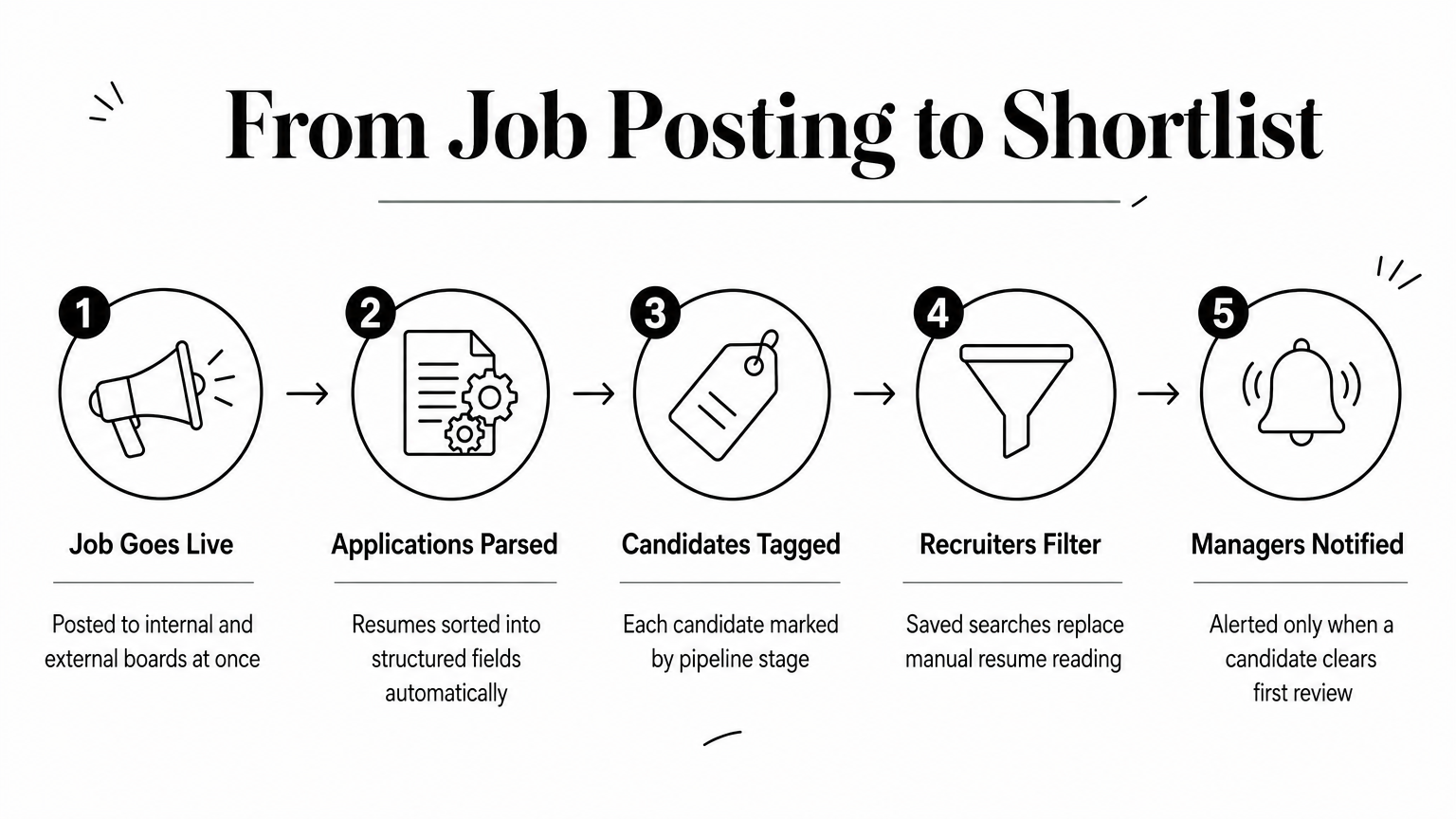
From job posting to shortlist
Every pipeline starts with intake, and that's where most of the manual grunt work used to live. Posting a role once and pushing it to multiple job boards, then watching applications land automatically in one queue, is the first real time-saver most teams notice. Here's the typical flow inside a modern recruiting ATS:
- Job goes live on the internal job board and external boards simultaneously.
- Applications arrive and get parsed automatically into structured fields (name, skills, experience, location).
- Candidates get tagged by stage, usually something like Applied, Screening, Interview, Offer, Hired.
- Recruiters filter and rank using saved searches instead of rereading every resume.
- Hiring managers get notified only when a candidate clears the recruiter's first pass.
Each step removes a manual handoff that used to happen over email, and each handoff removed is one less place a candidate can quietly disappear.
A candidate never gets lost in a system that tells you exactly where they sit.
Parsing, ranking, and matching
Parsing is the unglamorous engine behind most ATS software solutions, and it matters more than people expect. Good parsing pulls skills, job titles, years of experience, and education out of a messy PDF or DOCX and turns them into searchable fields, so a recruiter can filter 2,000 resumes down to 40 in seconds instead of scrolling for an hour. Olibr's ATS handles bulk uploads up to 10,000 profiles at once, parsing PDFs, DOCX, and CSVs so agencies migrating from spreadsheets don't lose months of sourcing history in the switch.
Matching goes a step further than parsing. Instead of just keyword search, AI matching compares a candidate's full profile against the job description and ranks fit based on actual skill overlap, seniority, and context, not just whether the word "Python" appears somewhere on the resume. This is the piece that separates basic ATS software for HR teams from tools built specifically for high-volume recruiting.
Collaboration and offer stage
Movement through the pipeline only works if the people making decisions can actually see it. A hiring manager leaving a comment directly on a candidate's profile, visible to the recruiter and anyone else on the req, replaces the old forwarded-email chain where feedback got lost between three inboxes. Notes stack up as a timeline, so anyone joining the hire mid-process can catch up in two minutes instead of asking someone to recap a month of back-and-forth.
Toward the end of the pipeline, the same system that tracked the candidate through screening should carry them through offer and onboarding notes too. Without that continuity, teams end up re-explaining context to whoever handles the paperwork, which defeats the point of having one record per candidate in the first place.
Key features that define effective ATS software
Not every tool that calls itself an ATS does the same job well, and the differences show up fast once you're managing real volume. Software ATS platforms range from bare-bones résumé storage to full recruiting suites, so it helps to know exactly which features actually move the needle versus which ones just look good on a sales page. The list below covers what separates a genuinely useful ats software company's product from one that just digitizes your old spreadsheet.
Resume parsing and structured search
Parsing quality determines everything downstream. If a system can't reliably pull skills, titles, and experience out of a résumé, every search built on top of it returns garbage, so it helps to know how AI actually reads a résumé. Look for ats software that handles PDF, DOCX, and CSV formats without manual cleanup, and that supports bulk uploads so you're not re-entering years of sourcing history one file at a time. Olibr's platform, for example, parses up to 10,000 profiles in a single batch, which matters if you're migrating off a spreadsheet-based process rather than starting from zero.
Pipeline visibility and team collaboration
Collaboration features are where most cheap tools fall short. A kanban-style board that shows every candidate's stage, along with notes and tags visible to the whole team, is the difference between a hiring manager checking a link and a hiring manager emailing you for the third time this week. Role-based permissions matter too, since not everyone on a hiring team should see salary notes or internal feedback meant for recruiters only.
The best ATS features are the ones you stop noticing because they just work.
AI matching and screening
Keyword search alone stopped being enough years ago, and any ats recruiting tool still relying on it will bury good candidates under exact-phrase matches. Resume screening software with AI matching ranks candidates by actual fit, skill overlap and seniority included, not just whether a word shows up on a résumé. Some platforms push further with AI video interviews that score transcripts and flag expression cues, which lets one recruiter screen far more candidates than manual first-round calls would allow.
Reporting, integrations, and access controls
Finally, a system needs to report on itself. Time-to-fill, source of hire, and pipeline conversion rates should be visible without exporting data into a separate spreadsheet just to build a chart. Unlimited team seats and clear permission tiers also matter more than most buyers expect until they're stuck paying per-seat fees to add a single coordinator.
| Feature | Why it matters |
|---|---|
| Bulk parsing (PDF, DOCX, CSV) | Preserves sourcing history during migration |
| AI matching beyond keywords | Surfaces qualified candidates keyword search misses |
| Kanban pipeline stages | Gives the whole team live visibility |
| Role-based permissions | Keeps sensitive notes restricted appropriately |
| Built-in reporting | Removes manual spreadsheet exports for metrics |
| Unlimited seats | Avoids per-user licensing costs as teams grow |
Getting these features right is what actually defines ats software solutions worth paying for, or in Olibr's case, worth using without paying at all. A tool missing even one of these pillars tends to create a new bottleneck exactly where it removed an old one, which is why it pays to test a platform against your real hiring volume before committing your team to it long-term.
ATS software for staffing agencies vs in-house HR teams
A staffing agency and an in-house HR team look at the same word, ATS, and mean two different tools. Agencies juggle dozens of clients, each with its own set of open reqs, and need an ATS for staffing firms that can slice candidates by client, role, and status without mixing data across accounts. In-house teams, by contrast, hire for one company, so their ats software needs lean toward integration with internal systems like payroll and onboarding rather than client-facing reporting. Knowing which camp you fall into changes what "good" looks like before you even start comparing vendors.

What staffing agencies actually need
Agencies live and die by candidate reuse. A recruiter placing candidates across five clients this quarter needs a database that resurfaces someone rejected by Client A but perfect for Client B, without violating any confidentiality terms between the two. Speed matters just as much, since agencies get paid on placements, not on process, so every day a candidate sits unprocessed is revenue slipping away. Volume tools like bulk parsing and AI ranking aren't nice extras here, they're the difference between filling a req in ten days versus thirty.
- Multi-client pipeline separation, so candidate data for one client never leaks into another's view.
- Fast bulk upload, since agencies inherit résumé backlogs when onboarding new recruiters.
- Shared candidate pools, so sourcing effort for one search benefits future searches too.
- Credit or access-based models, which fit agencies better than flat per-seat licensing when headcount fluctuates with contract volume.
Olibr's model was built with exactly this pattern in mind. Contributing dormant profiles from your own database unlocks the ability to search 180,000+ verified candidates in a shared pool, which matters more to a staffing agency running multiple searches at once than it does to a company hiring for a single internal role.
What in-house HR teams actually need
In-house teams run fewer simultaneous reqs but need deeper alignment with hiring managers who aren't recruiting professionals themselves. That means the tool has to be simple enough for a department head to check without training, and structured enough that HR can still pull clean metrics for leadership. Compliance also weighs heavier here, since a single company's hiring practices get audited as one unit, not spread across client contracts the way an agency's work is.
The right ATS fits how you hire, not how the vendor imagined you'd hire.
Compensation notes, internal referrals, and headcount approvals often need to live inside the same ats hr software that tracks candidates, because in-house recruiting rarely happens in isolation from the rest of HR. Reporting also skews toward internal benchmarks like time-to-fill by department, rather than client-facing placement speed.
Where the two overlap
Despite the differences, both groups need the same foundation: reliable parsing, clear pipeline stages, and a searchable history that doesn't evaporate once a candidate gets rejected. The split shows up in scale and reporting focus, not in the core mechanics of the tool.
| Need | Staffing agency | In-house HR team |
|---|---|---|
| Client/data separation | Critical | Not applicable |
| Reporting focus | Placement speed per client | Time-to-fill per department |
| Volume handling | High, multiple reqs at once | Moderate, fewer concurrent roles |
| Team size flexibility | Fluctuates with contracts | Stable, fixed headcount |
| Compliance scope | Per client contract | Company-wide |
Getting this distinction wrong is a common reason ats recruitment software rollouts stall. A team buys a tool built for enterprise HR when they're really running an agency workload, or vice versa, and ends up paying for features that solve someone else's problem instead of theirs.
Free vs paid ATS software options in India and beyond
Price is usually the first filter recruiters apply when comparing tools, and it's also the fastest way to end up with the wrong system. "Free" ats software ranges from genuinely full-featured to a stripped-down trial designed to push you toward a paid tier within thirty days. Understanding what each pricing model actually restricts, not just what it costs, matters more than the sticker price, and it helps to know why ATS pricing climbed so high before evaluating ats software solutions for a team that's going to depend on this tool daily.
What "free" usually means in practice
Budget-tier tools typically cap something: candidate records, active job postings, team seats, or storage. Some free plans look generous until you hit 500 candidates and get hit with an upgrade wall mid-hiring-cycle, which is worse than paying upfront because you've already built pipeline history you don't want to lose. Genuinely free applicant tracking systems, by contrast, don't gate core functionality behind a paywall, they fund themselves a different way. Olibr's ATS is free because the business model runs on a data-sharing exchange instead of subscriptions: recruiters contribute dormant candidate profiles from their own sourcing history and unlock access to a shared pool of 180,000+ verified candidates plus the full platform, no credit card required.
Free only means something if the features you actually need aren't locked behind it.
When paid tiers make sense
Paid ats recruiting software earns its cost in specific situations. Retained search firms and NDA-bound recruiters often can't share candidate data at all, so a paid tool with full data separation and encryption is worth paying for even when a free, community-based alternative exists. Larger enterprise HR teams sometimes need deep integrations with existing HRIS or payroll systems that only paid tiers support. And some agencies simply prefer predictable per-seat billing over any kind of credit or contribution model, even if it costs more over a year.
Comparing the models side by side
| Model | How you pay | Best fit |
|---|---|---|
| Free, feature-capped | Nothing, until you hit limits | Very small teams, low volume |
| Paid, per-seat | Monthly fee per user | Teams needing deep HRIS integration |
| Credit-based, data-sharing | Contribute dormant profiles for access | Agencies open to a shared candidate pool |
| Private paid plan | Flat fee, no data sharing | NDA-bound or retained search firms |
What this looks like in the India market
An applicant tracking system india buyer, especially a startup comparing free ATS options in India, often faces a specific squeeze: agency margins are tighter than in the US, so stacking a paid ATS on top of separate job board and database subscriptions eats into placement fees fast. That's part of why credit-based models have gained traction here, they let a recruiter turn candidate data they already have, but aren't using, into access instead of a recurring invoice. A recruiter sitting on 3,000 dormant profiles from past searches effectively already owns the currency this model runs on. Before signing up for any paid ats recruitment software, it's worth asking whether you're paying for genuinely new capability or just for access you could unlock a different way, through data you're already sitting on and not using.
How to choose the right ATS software company
Choosing between dozens of ats software companies feels harder than it should be, mostly because every vendor's demo looks identical: clean dashboard, smiling stock photos, a kanban board with three sample candidates, which is why side-by-side ATS reviews are worth reading first. The real differences only show up once you dig into how each company built its product and what it actually costs once you're past the trial period. Below is a practical way to filter vendors before you waste a month on a pilot that goes nowhere.
Start with your actual workflow, not the feature list
Every vendor pitch leads with a feature list, but your hiring workflow should decide what you need, not the other way around. If you're an agency running 20 open reqs across five clients, prioritize ats software for recruitment that handles multi-client separation cleanly. If you're an in-house team, prioritize how easily a non-recruiter hiring manager can use it without a training call. Write down your three biggest current bottlenecks before you take a single demo, then ask each vendor directly how their tool solves those three, not what else it can do.
Choose the tool that fixes your bottleneck, not the one with the longest feature list.
Test data portability before you commit
Ask what happens to your candidate data if you ever leave. A company confident in its product lets you export everything, parsed fields included, without a support ticket or a fee. One that hedges on this question is telling you something about how they plan to retain customers, and it's not through better service. Any serious ats recruiting software vendor should answer this in one sentence, not a follow-up call with sales.
Ask about pricing traps upfront
Per-seat pricing sounds simple until you add a coordinator, a hiring manager, and a client-side contact and watch the bill triple. Before signing anything, get specific answers on these points:
- What counts as a seat, and does adding a read-only hiring manager cost the same as adding a recruiter?
- What triggers an upgrade, candidate count, active job postings, or storage limits?
- Is bulk parsing capped, and if so, at what volume?
- Does the free tier expire, or gate features after a set number of hires?
Olibr sidesteps most of this by running on a data-sharing exchange rather than per-seat billing, so pricing questions mostly disappear for teams willing to contribute dormant profiles instead of paying monthly.
Check support and onboarding quality
Support quality only reveals itself after something breaks, which is exactly when you need it most. Look for a vendor that offers real onboarding help for bulk migration, since moving thousands of résumés from an old system is where most rollouts stall. Reviews on independent platforms tend to surface support complaints faster than a sales call ever will, so it's worth a quick search before signing anything longer than a month-to-month agreement.
Getting this decision right matters more than most teams admit upfront, since switching ats hr software mid-year means re-migrating data and retraining a team twice in one hiring cycle. Spend the extra week evaluating now, and you avoid spending three months undoing a bad pick later.
Common ATS mistakes that slow down hiring
Even a well-built software ats platform fails if the team using it falls into predictable habits. Most of the slowdowns that get blamed on "the system" actually trace back to how it's configured or ignored, not a flaw in the tool itself. Knowing the common failure points ahead of time saves you from repeating them with whatever ats recruiting software you eventually pick.
Letting the candidate database go stale
Recruiters load hundreds of résumés into a system during active sourcing, then forget those records exist the moment a role closes. Dormant candidate data is the single biggest waste in most ATS setups, since a person who wasn't right for one role last year might be exactly right for a different one today, which is the whole point of building a talent pool you reuse. Teams that never revisit old pipelines end up re-sourcing the same skill sets from scratch every quarter, paying twice for work they already did once.
The most expensive mistake in recruiting is sourcing a candidate you already had.
Overcomplicating the pipeline with too many stages
Some teams build pipelines with twelve stages when four would do, splitting "Phone Screen" from "Phone Screen Scheduled" from "Phone Screen Completed" until nobody can tell where a candidate actually stands. Pipeline bloat slows everyone down because moving a candidate forward now takes three clicks instead of one, and reporting gets muddier as stages multiply. Keep recruiting pipeline stages tied to real decisions, not to every micro-step in your calendar.
Ignoring adoption by hiring managers
An ATS only works if everyone touching a hire actually uses it, and hiring managers are usually the weak link. If a manager still asks for résumés over email because logging into the tool feels like extra work, you haven't deployed an ats hr software solution, you've added a second system running in parallel. That doubles the admin burden on recruiters, who end up updating both the tool and the inbox thread just to keep everyone aligned.
| Mistake | What it costs you |
|---|---|
| Ignoring old candidate records | Re-sourcing skills you already found once |
| Too many pipeline stages | Slower updates, muddier reporting |
| Low hiring manager adoption | Duplicate work across tool and email |
| No follow-up on stalled candidates | Candidates ghost or accept other offers |
| Skipping data export checks | Lock-in risk if you switch tools later |
Letting candidates stall without follow-up
A candidate sitting in "Interview Scheduled" for two weeks without movement is a red flag most teams miss until the candidate accepts an offer elsewhere. Stalled pipeline stages happen because nobody owns the follow-up once a candidate clears the first screen, especially on teams juggling multiple open reqs. A simple weekly check of anything untouched for more than five business days catches most of these before you lose the candidate entirely.
Treating the ATS as storage instead of a search tool
The last mistake is subtler: using an ATS purely to log what happened rather than to find who's already in your database for a new role. Recruitment CRM software thinking flips that habit, treating every past candidate as a searchable asset instead of a closed file. Teams that adopt Olibr's shared talent network tend to break this habit fastest, since contributing dormant profiles only pays off if you're also searching the pool actively rather than treating it as a one-time upload.
Making your next ATS decision easier
Every question in this guide comes back to one point: software ats platforms only earn their keep when they turn dormant candidate data into something searchable and reusable, not another database you forget about after launch. Pick a system based on your actual workflow, agency or in-house, free or paid, and you'll avoid the stalled pipelines and pricing traps that derail most rollouts. Prioritize parsing quality, real pipeline visibility, and honest data portability over a flashy demo, since those three things determine whether your team still trusts the tool six months in.
Skip the guesswork and try the model built around this exact problem. Create a free recruiter account on Olibr, get the full ATS with unlimited job postings, and unlock a shared pool of 180,000+ verified candidates by contributing the profiles already sitting unused in your own database. No credit card, no per-seat pricing, just a system that pays you back for data you already have.
For hiring teams
Search 180,000+ candidate profiles — free.
Olibr is a community-funded recruiting platform: full ATS, AI interviews, and a shared resume database. No per-seat fees.