How To Use AI For Recruiting: Automate Sourcing To Offers
Most recruiters spend their days buried in repetitive tasks, screening hundreds of resumes, chasing candidates for interview slots, and copying data between tools. It's slow, expensive, and honestly, a waste of talent. That's exactly why more hiring teams are figuring out how to use AI for recruiting: not to replace human judgment, but to eliminate the manual grind that eats up 60–70% of their workday.
AI recruiting tools have moved well past the buzzword stage. They now handle real work, matching candidates to roles based on career trajectory, conducting structured interviews, and scoring applicants before a recruiter ever opens a profile. The shift isn't theoretical. Recruiting teams using AI report up to 75% faster screening times and significantly shorter hiring cycles. The question is no longer whether AI belongs in your hiring process, but where to plug it in first.
This guide breaks down the practical, step-by-step ways to apply AI across your entire recruiting pipeline, from sourcing and resume parsing to interviews and offer management. Each section covers what AI actually does at that stage, how to implement it, and where the pitfalls are. We built Olibr around many of these same principles: AI-powered candidate matching, automated interview scoring, and intelligent resume parsing, all accessible without a subscription fee. So the strategies here aren't abstract, they're the same mechanics we see working every day on our platform. Let's get into it.
What you need before you add AI to recruiting
Before you figure out how to use AI for recruiting, you need to get honest about the state of your current process. AI tools don't fix broken workflows, they amplify them. If your job descriptions are vague, your resume database is a disorganized pile, and your team can't agree on what a good candidate looks like, adding AI to that mix will produce fast but inaccurate results. Getting the foundations right before you switch anything on is what separates teams that see real efficiency gains from teams that pay for tools that collect dust. Skipping this prep work is the most common reason AI recruiting projects fail in the first 60 days.
Audit your current recruiting stack
The first thing to do is map out every tool you currently use: your ATS, your sourcing platforms, your communication tools, and your interview scheduling software. You need to know which tools hold candidate data, how that data is structured, and whether your systems can actually connect to or export data for an AI layer. Many teams discover at this stage that candidate records are split across spreadsheets, email threads, and an underused ATS with no clear owner.
Ask yourself these questions before you add anything new:
- Where does every candidate record currently live?
- Are your job descriptions stored in a consistent, searchable format?
- Do you have a clearly defined hiring stage for each step from application to offer?
- Can your current ATS export data in CSV or connect via API?
- Who on your team owns candidate data hygiene?
If you can't answer these questions confidently, fix that before touching any AI tool. Clean, organized data is the single biggest factor in getting accurate AI outputs.
Define what "good" looks like for each role
AI matching and screening tools work by comparing candidates against a defined profile of what success looks like in a given role. If you haven't defined that clearly, the AI has nothing meaningful to work with. For each open role, you need a structured definition that goes well beyond a job title: the required skills, the non-negotiables, the experience type (startup vs. enterprise, individual contributor vs. team lead), and the signals that have predicted strong hires in the past.
Take a senior backend engineer role as an example. "Five years of experience" gives an AI model very little to rank candidates accurately. A structured profile might instead specify: Python or Go proficiency, direct experience with distributed systems, a history of shipping production code rather than internal tooling only, and evidence of technical leadership. The more specific your input criteria, the more precise and useful your AI output will be.
Prepare your data and set baseline metrics
Before deploying any AI tool, pull your current recruiting metrics so you have a real benchmark to measure against. You need to know your starting point, or you'll have no way to evaluate whether AI is actually helping. Track these numbers now:
| Metric | Why it matters |
|---|---|
| Time to fill (days) | Measures overall hiring speed |
| Resumes reviewed per hire | Shows screening efficiency |
| Offer acceptance rate | Indicates quality of match and process |
| Source of hire | Tells you where strong candidates come from |
| Interview-to-offer ratio | Flags bottlenecks in your funnel |
Your candidate database also needs a basic cleanup pass before you run any AI-powered matching. Duplicate profiles, missing contact details, and untagged skills all reduce the accuracy of AI results significantly. Standardizing your location fields, seniority labels, and skill tags across even a portion of your database will noticeably improve the quality of what the AI surfaces. Plan for roughly 15 minutes of cleanup per 100 records as a realistic starting estimate.
Step 1. Map your hiring workflow and clean your data
Before you do anything else, draw your hiring process from end to end on a single document or whiteboard. Every stage, from the moment a job req opens to the day someone signs an offer letter, needs to be visible in one place. Most teams discover gaps they didn't know existed: stages that rely on email threads, handoffs that depend on one person's memory, or approval steps with no clear owner. Mapping this out shows you exactly where AI can replace manual effort and where human judgment still needs to stay in the loop.
Draw your workflow as a stage-by-stage map
List every stage your candidates move through, label who owns each stage, and note what tool or process currently handles it. Here is a simple template you can fill in today:
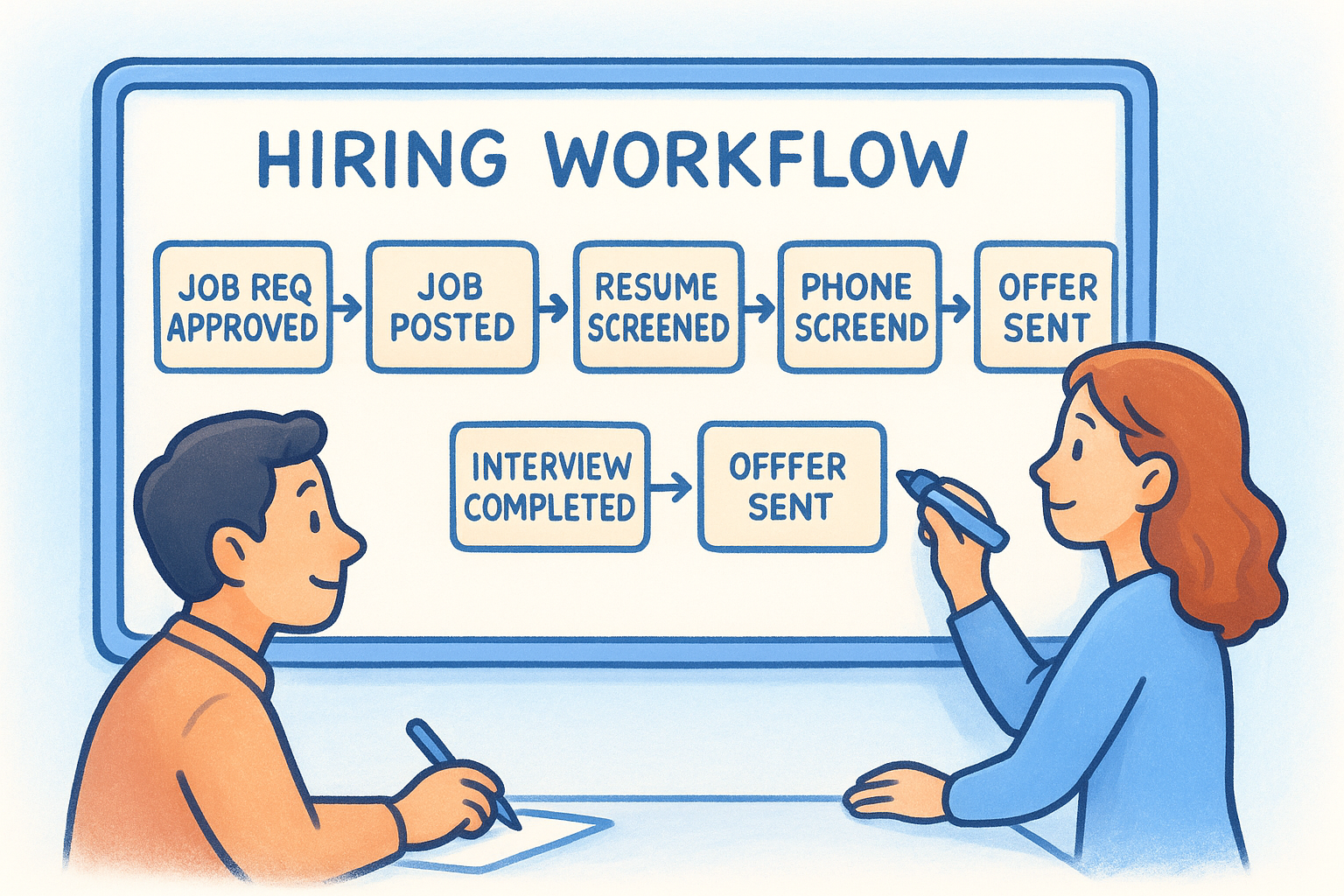
| Stage | Owner | Current tool/process | Manual effort |
|---|---|---|---|
| Job req approved | Hiring manager | Email thread | High |
| Job posted | Recruiter | ATS or job board | Medium |
| Resume screened | Recruiter | Manual review | Very high |
| Phone screen scheduled | Recruiter | Email/calendar | High |
| Interview completed | Hiring panel | Video call | Medium |
| Offer sent | HR/Recruiter | Medium |
Once you complete this map, the stages marked "very high" or "high" are your first AI targets. Screening, scheduling, and sourcing sit at the top of that list for most teams, which is exactly where most AI recruiting tools focus their automation.
Clean your candidate data before running any AI
Dirty data produces bad AI outputs. Before you run any matching or scoring tool, go through your existing candidate records and standardize the fields AI relies on most: job titles, skill tags, location format, and seniority level. A candidate tagged as "Sr. Engineer" in one record and "Senior Software Engineer" in another creates duplicate matches and inaccurate scoring that no AI tool can correct for you.
A 30-minute cleanup on your most active job categories does more for your AI results than any configuration setting inside the tool itself.
When you think about how to use AI for recruiting effectively, the payoff of clean data compounds across every downstream step: resume ranking, candidate matching, and interview scheduling all produce more reliable results when the input is consistent. Budget roughly 15 minutes per 100 candidate records as a realistic time estimate before you flip any AI feature on.
Step 2. Use AI to source and rediscover candidates faster
Most recruiting teams already have hundreds or thousands of candidate profiles sitting in their ATS doing nothing. Before spending a dollar on new sourcing channels, your first move is to run AI matching against that existing database. This is one of the most underused applications when teams figure out how to use AI for recruiting, and it often surfaces strong candidates within hours rather than days. Rediscovering past applicants who were a near-miss for a previous role, or who have since gained the skills you need, costs nothing and can cut your time-to-fill significantly.
Mine your existing candidate database before sourcing externally
AI matching tools scan your existing profiles against a structured job description and rank candidates by fit. The key is giving the AI a detailed, specific input rather than a generic job title. Use the structured role profile you built in the previous step, and let the tool surface the top 20-30 matches automatically.
Here is a basic sourcing prompt template you can adapt for any AI matching tool:
Role: [Job title]
Required skills: [List 4-6 specific skills]
Experience type: [e.g., startup environment, distributed systems, client-facing]
Seniority: [e.g., 5+ years, individual contributor]
Non-negotiables: [e.g., must have shipped production code, must have led a team]
Exclude: [e.g., candidates already rejected for this role in last 90 days]
The more context you feed the AI at this stage, the fewer irrelevant profiles it surfaces, which saves you meaningful time downstream.
Expand outward to job boards and passive candidates
Once you exhaust your internal database, AI sourcing tools can scan external platforms and flag profiles that match your structured criteria. Tools that integrate with LinkedIn or Naukri allow you to capture candidate profiles directly through browser extensions and feed them into your matching pipeline without manual data entry.
Passive candidates respond better to personalized outreach, and AI can help you identify the right signals for timing: a recent promotion, a new skill added to a profile, or a spike in content activity. Set up keyword and filter alerts based on your role criteria so the AI continuously surfaces new matches rather than requiring you to run the same search manually every week.
Step 3. Automate resume screening and build a shortlist
Manual resume screening is where most recruiting time disappears. When you understand how to use AI for recruiting, this step delivers the most immediate time savings across your entire pipeline. AI screening tools parse each resume, extract structured data from unstructured text, and score candidates against your defined criteria automatically. Instead of reading 200 resumes to find 10 worth a closer look, you receive a ranked shortlist in minutes, with the reasoning behind each score visible directly in the interface.
Set your scoring criteria before you run the screen
The output of AI screening is only as good as the criteria you feed it. Before you run any automated screen, define the must-have qualifications and the nice-to-haves separately, in writing, not just in your head. Mixing them together causes the AI to penalize strong candidates for missing optional criteria, which skews your shortlist toward safe but mediocre fits.
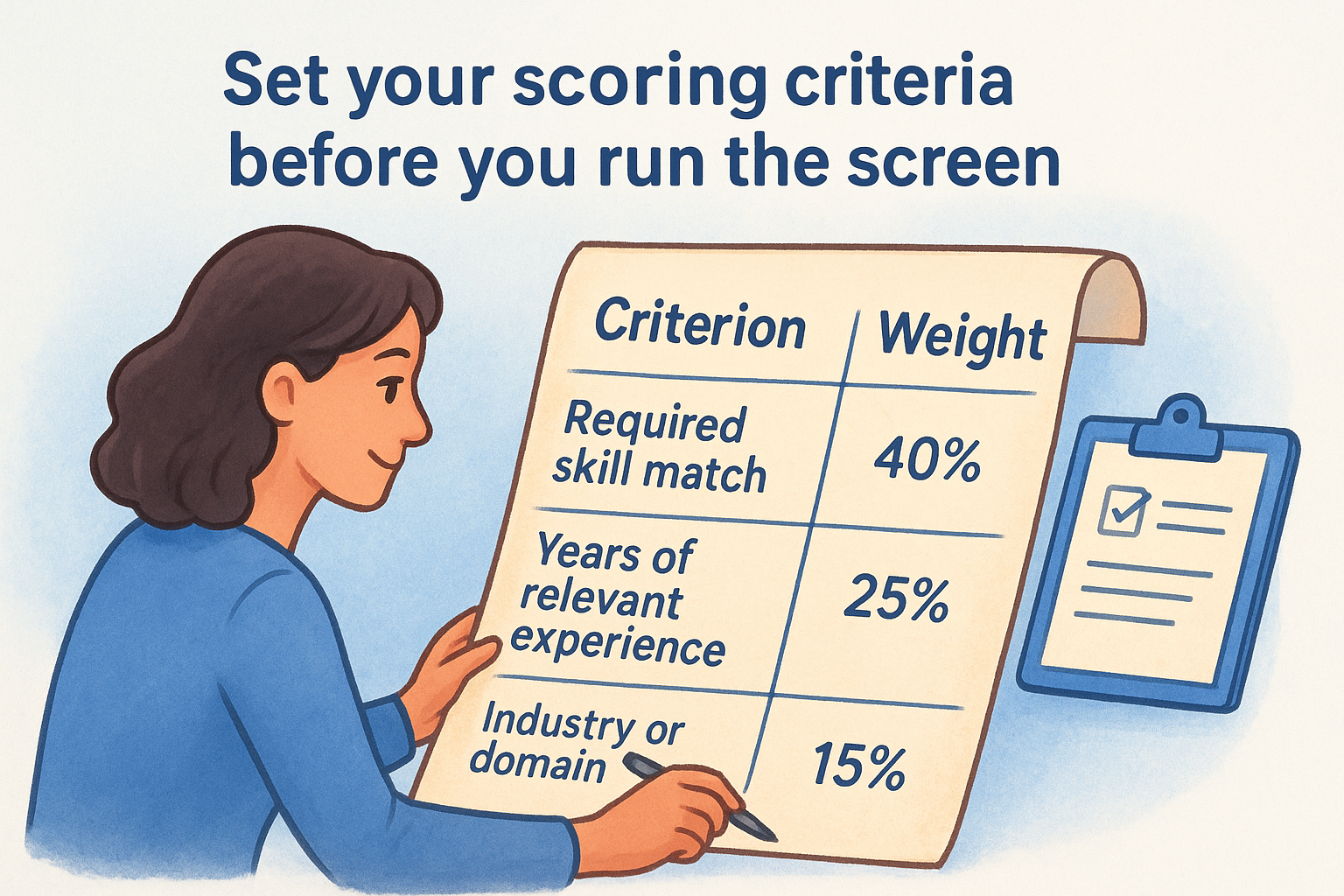
Use a simple scoring weight template like this one before each screen:
| Criterion | Type | Weight |
|---|---|---|
| Required skill match | Must-have | 40% |
| Years of relevant experience | Must-have | 25% |
| Industry or domain background | Nice-to-have | 15% |
| Career trajectory (growth pattern) | Nice-to-have | 20% |
Spending 10 minutes defining weights before a screen consistently saves more time than any configuration setting inside the tool itself.
Review AI scores with a consistent threshold
Once the AI produces a ranked list, set a minimum score threshold before you open a single profile. This prevents you from drifting into borderline candidates out of habit rather than strategic intent. A threshold of 70% or above on your defined criteria is a solid starting point for most technical roles, though you should adjust it based on how competitive the role is and the size of your applicant pool.
Flag any candidate the AI scores between 65 and 75% for a quick manual review pass rather than an automatic discard. AI tools occasionally underweight unconventional but strong career paths, particularly for candidates who changed industries or held non-traditional titles. Treating that band as a "review" tier instead of a rejection prevents you from discarding candidates worth a second look.
After each hiring cycle, compare your AI shortlist against your actual hires and update your scoring weights accordingly. Teams that iterate on their criteria after each search get progressively more accurate shortlists over time, while teams that leave the defaults untouched see diminishing returns.
Step 4. Personalize outreach and manage follow-ups at scale
Generic outreach gets ignored. When you understand how to use AI for recruiting, you can send messages that reference a candidate's actual background, specific projects, or career trajectory without writing each one manually. AI tools generate personalized first-contact messages at scale by pulling structured data from candidate profiles and injecting relevant details into a consistent template. The result is outreach that reads like you spent real time on it, even when you're reaching out to 50 candidates in a single afternoon.
Build a message template AI can personalize
The most effective approach is to write a core message structure with clearly marked variable fields, then let the AI fill in the candidate-specific details automatically. Your template needs three components: a hook that references something specific to the candidate, a concise description of the role and why it fits them, and a single low-friction call to action.
Here is a template structure you can use directly:
Subject: [Role] at [Company] - your [specific skill/project] caught our attention

Hi [First name],

I came across your background in [specific skill or domain] and thought you'd be
a strong fit for a [role title] position we're hiring for at [Company].

We're specifically looking for someone with [1-2 specific criteria from their profile].
Based on your experience with [referenced detail from resume], I think this could
be worth a quick conversation.

[One sentence on what makes this role interesting or different.]

Are you open to a 15-minute call this week?

[Your name]
Keep your call to action to a single question. Giving candidates two or three options in the same message drops your reply rate significantly.
Automate your follow-up sequence without losing the human tone
Most recruiters follow up once and move on, which leaves a large percentage of interested candidates unconverted due to timing alone. AI-powered outreach tools let you set up a sequence of two to three follow-up messages that trigger automatically based on non-response, spaced three to five days apart. Each follow-up should shift the angle slightly: the first message focuses on the role, the second adds a detail about the team or the problem they'd be solving, and the third is a short, direct check-in.
Track your reply rates by message and by candidate segment. Consistent underperformance on a specific role or seniority level signals that your hook needs adjustment before you run the next sourcing batch. Iterating on message content after each campaign produces measurable improvements in pipeline volume over time.
Step 5. Remove scheduling friction with AI coordination
Interview scheduling is one of the most time-consuming back-and-forth tasks in any hiring process, and it has nothing to do with finding the right person. A single interview slot can require four to six emails to confirm, especially when you're coordinating across multiple interviewers and time zones. When you understand how to use AI for recruiting end-to-end, scheduling is an obvious automation target: it's repetitive, rule-based, and completely solvable without a human in the loop.
Connect your calendar and define your availability rules
AI scheduling tools work by reading your live calendar availability and presenting open slots directly to candidates through a self-booking link. The setup takes less than 30 minutes and eliminates the need to manually propose times, wait for a response, and confirm. Before you generate any scheduling link, define clear rules for what your availability should look like during active hiring periods.
Set these parameters in your scheduling tool before sharing any links:
- Buffer time: 15 minutes between consecutive interviews to avoid back-to-back fatigue
- Blackout windows: block focus time in the morning and any recurring internal meetings
- Interview duration: set a fixed block per stage (for example, 30 minutes for screening, 60 minutes for technical rounds)
- Time zone handling: enable automatic time zone detection so candidates see slots in their local time
- Advance notice: require at least 24 hours notice for any new booking
Giving candidates a direct booking link cuts your scheduling-to-confirmation time from an average of two days down to under two hours for most roles.
Handle rescheduling and reminders without manual follow-up
Cancellations and rescheduling requests are inevitable, and handling them manually pulls you out of deeper recruiting work every time one comes in. Configure your AI scheduling tool to automatically send a new booking link whenever a candidate cancels, with a deadline attached. Setting a 48-hour rebooking window keeps your pipeline moving without you needing to chase anyone.
Automated reminders also reduce no-show rates significantly. Send a confirmation email immediately after booking, a 24-hour reminder, and a final message one hour before the interview. Include the video call link in every message so candidates never need to search for it. Teams that run this sequence consistently see no-show rates drop by 30 to 40 percent compared to manual reminder processes.
Step 6. Run AI-assisted interviews and capture better signals
Phone screens and first-round interviews absorb hours of recruiter time that could go toward higher-value work. AI-conducted interviews let candidates complete a structured set of questions asynchronously, on their own schedule, while the AI records responses, scores answers against your defined criteria, and flags key behavioral signals automatically. When you think about how to use AI for recruiting at the interview stage, the goal isn't to remove human judgment from the final decision. It's to capture richer, more consistent data from every candidate before you commit time to a live conversation.
Configure your interview structure before candidates go through it
The quality of an AI interview depends entirely on how well you design it upfront. Generic questions produce generic answers, and generic answers give the AI very little to distinguish strong candidates from average ones. Before you send a single invite, define the specific competencies you're assessing at this stage and write questions that surface direct evidence of those competencies.
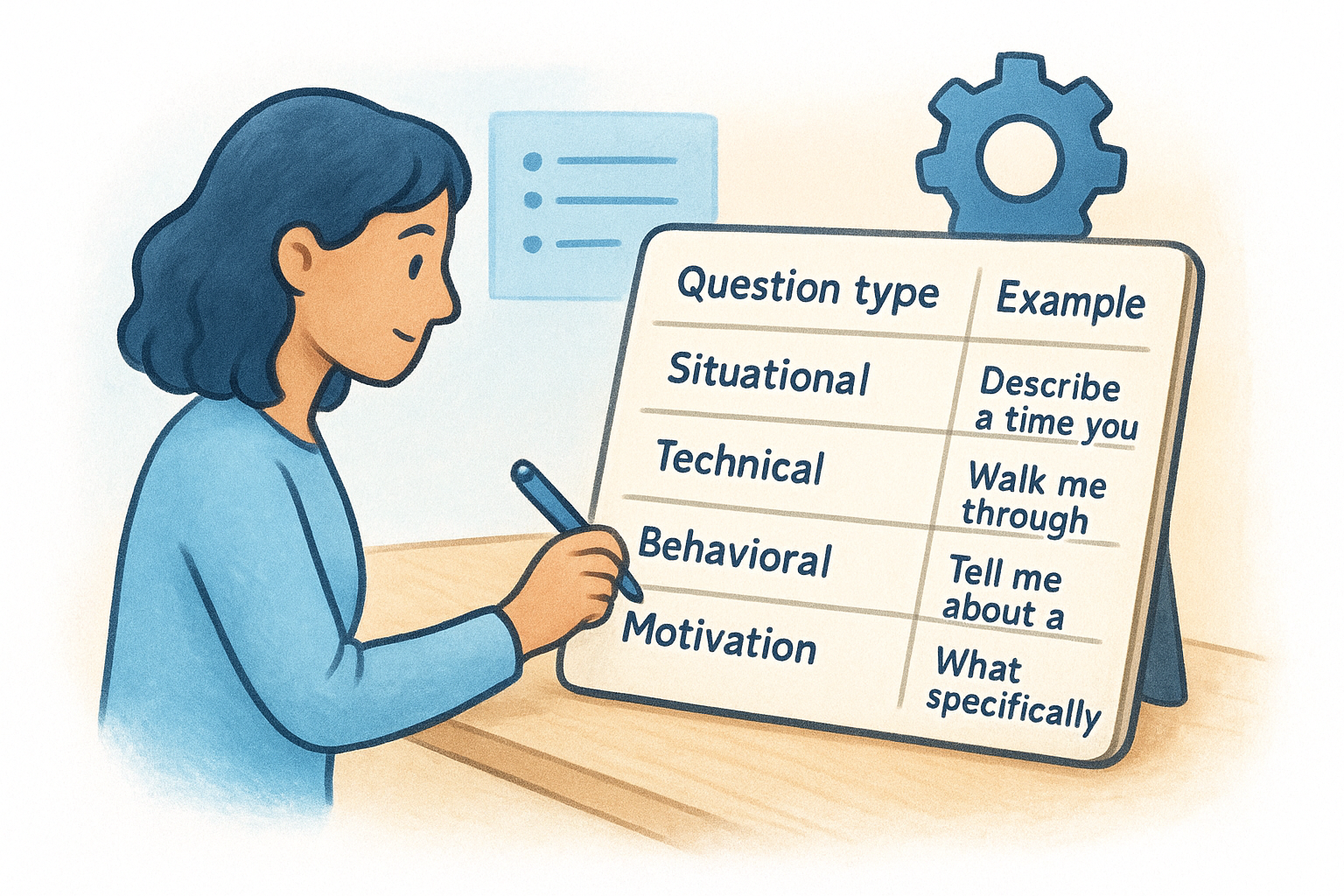
Use this structure as a starting point for a technical screening interview:
| Question type | Example | What it measures |
|---|---|---|
| Situational | "Describe a time you debugged a critical production issue under time pressure." | Problem-solving, composure |
| Technical | "Walk me through how you'd design a rate-limiting system for an API." | Depth of knowledge |
| Behavioral | "Tell me about a project where you disagreed with your team's approach." | Collaboration, communication |
| Motivation | "What specifically attracted you to this role over others you're considering?" | Fit and intent |
Running every candidate through the same question set makes your comparisons reliable. Changing questions mid-process introduces inconsistency that skews your scoring data across the board.
Review AI scores alongside the behavioral signals it captures
AI interview tools do more than transcribe answers. Platforms that include facial expression analysis and tone scoring give you a layer of signal beyond what a candidate says, flagging things like hesitation patterns, confidence level, and response consistency across questions. These signals don't replace your judgment, but they surface patterns you would likely miss when scanning a text summary alone.
After each batch of AI interviews, compare the top-scoring candidates against the ones your team would have selected based on resume review alone. Tracking where AI scores and your instincts diverge over multiple hiring cycles tells you whether your question set is actually aligned with what predicts strong performance in that specific role. Adjust your questions and scoring weights after each cycle, not once a quarter.
Step 7. Make decisions, manage offers, and improve with analytics
By the time you reach this stage, AI has already done a significant portion of the screening and signal-gathering work for you. Your job now is to use that structured data to make a sharper final decision rather than falling back on gut instinct alone. This is where understanding how to use AI for recruiting pays off in the most measurable way: every step up the funnel generated data points you can now compare side by side before committing to an offer.
Compare finalists using a structured scorecard
Before you extend an offer, pull the AI scores, interview results, and any behavioral flags for your top three to five candidates into a single comparison view. Ranking candidates in your head introduces recency bias, where whoever you spoke to most recently feels like the strongest fit. A scorecard forces the comparison to be explicit and consistent.
Use this template to build your finalist comparison:
| Candidate | AI match score | Interview score | Must-have skills met | Hiring manager rating |
|---|---|---|---|---|
| Candidate A | 87% | 82% | 5/5 | Strong yes |
| Candidate B | 79% | 91% | 4/5 | Yes |
| Candidate C | 85% | 76% | 5/5 | Borderline |
A candidate who scores high on interview performance but low on AI match often signals a skills gap the interview questions didn't surface directly. Investigate before proceeding.
Close the offer faster with structured communication
Once you select a finalist, move within 24 hours. Delayed offers are one of the top reasons strong candidates accept competing roles. Use a short, direct offer summary email that covers compensation, start date, and next steps in a single message. Avoid multi-paragraph introductions before you get to the actual terms.
Run a post-hire review to sharpen your process
After each hire closes, spend 20 minutes comparing your AI shortlist against who actually performed well in interviews. Note where the AI rankings aligned with your final decision and where they diverged. This review is the single fastest way to improve your scoring criteria over time.
Track two numbers after every search: the AI-to-hire conversion rate (how many AI-recommended candidates converted to offers) and the offer acceptance rate. Drops in either metric signal a specific stage that needs attention, whether that's your scoring weights, your outreach messaging, or how your interviews are structured.
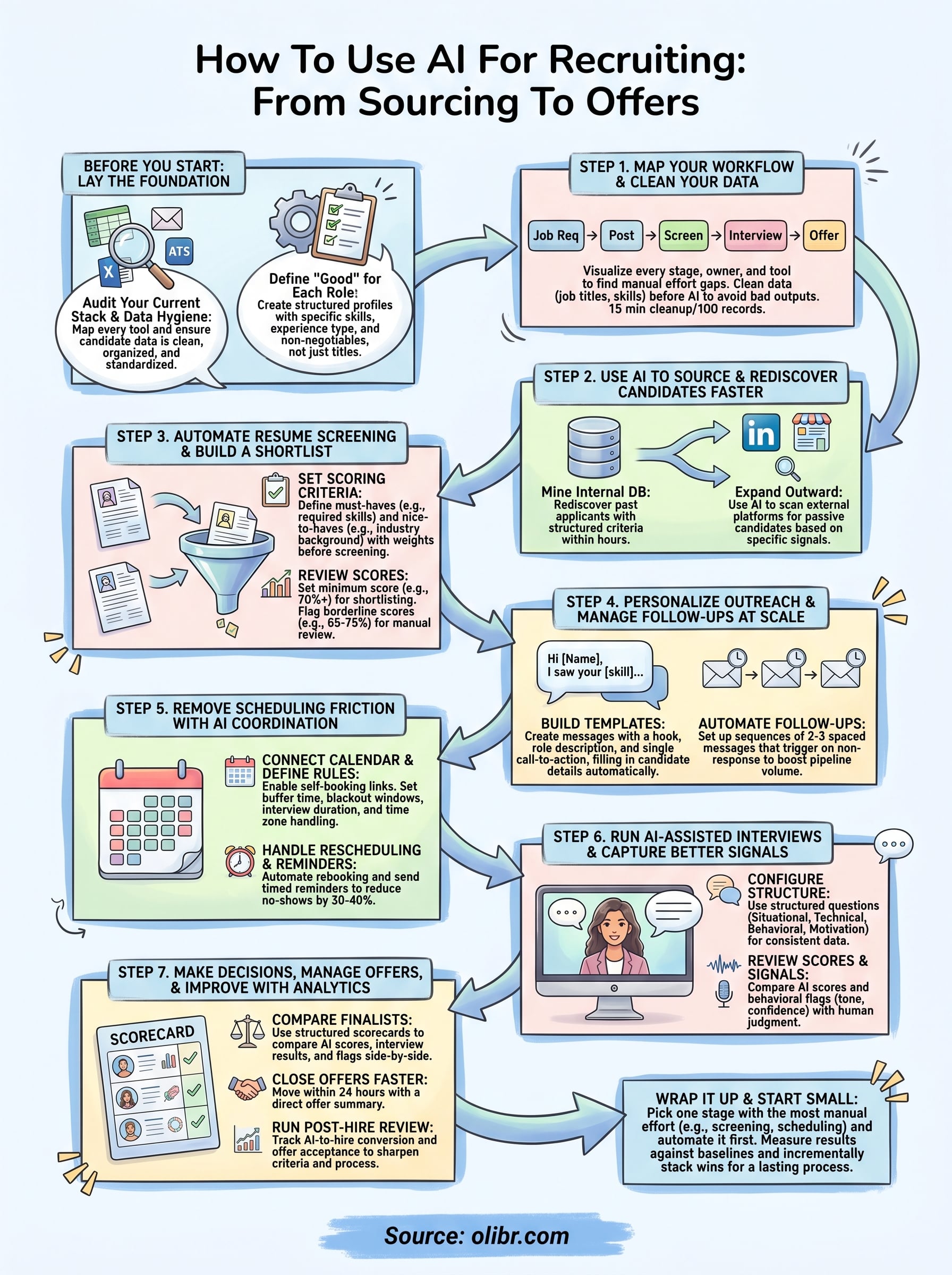
Wrap it up and start small
The full picture of how to use AI for recruiting can look like a lot to implement at once. It doesn't have to be. Pick one stage where your team loses the most time, whether that's resume screening or interview scheduling, and apply one tool there first. Get a real result, measure it against your baseline metrics, and then move to the next stage. Stacking incremental wins is how you build a process that actually holds rather than a collection of tools nobody uses consistently.
Every step in this guide works independently. You don't need to automate all seven stages before you see a return. Start with clean data, define what a strong candidate looks like for your next open role, and run one AI screen. If you want a free platform that handles matching, parsing, and AI-conducted interviews in one place, start hiring on Olibr today.
For hiring teams
Search 180,000+ candidate profiles — free.
Olibr is a community-funded recruiting platform: full ATS, AI interviews, and a shared resume database. No per-seat fees.