ATS Software Full Form: What It Means in Recruiting
If you have ever typed ats software full form into Google before a client call or a job description meeting, you already know the answer feels simpler than it should be. ATS stands for Applicant Tracking System, but that three-letter expansion barely explains what the software actually does inside a recruiting team's daily work.
Here is the direct answer: an ATS is the platform recruiters use to post jobs, collect resumes, and move candidates through pipeline stages like screened, interviewed, and offered. It replaces spreadsheets and scattered email threads with one system that tracks every applicant from first contact to hire, which is why staffing agencies and in-house TA teams treat it as core infrastructure rather than optional software.
In this article, you will get a plain-language breakdown of the ATS full form, how these systems actually function behind the scenes, and where resume parsing and candidate ranking fit into the process. We will also cover why so many recruiting teams end up paying for multiple tools stacked around their ATS, and how a free, all-in-one alternative like Olibr changes that math without cutting corners on functionality.
Why understanding ATS matters for recruiters
Knowing the ats software full form is only step one. Recruiters who understand how the system filters, ranks, and stores candidates make better decisions about which tools to buy, which job descriptions to write, and which resumes actually reach a human. Misunderstanding the mechanics costs real time and real placements, not just trivia points on a quiz.
The cost of not knowing how ATS works
Many recruiters assume an ATS rejects resumes outright for missing keywords, a myth that leads to over-engineered job descriptions and wasted screening time. In reality, most modern applicant tracking systems rank and sort rather than reject, surfacing the best matches first instead of silently discarding the rest. Teams that misunderstand this spend hours reformatting job ads for "ATS compatibility" when the bigger problem is usually a messy candidate database full of duplicate, outdated, or unparsed profiles.
An ATS sorts candidates, it rarely deletes them, so the real bottleneck is almost always data quality, not keyword tricks.
Why this knowledge shapes buying decisions
Recruiters who grasp what an ATS actually does are better equipped to compare vendors instead of buying on brand name alone. Staffing agencies juggling dozens of open requisitions need to know whether a system's pipeline stages map to their actual workflow, or whether they're paying for automation that never gets used. Understanding also matters when a client asks how candidates are sourced or screened, since agencies bound by service-level agreements need to explain their process with confidence, not guesswork.
Ultimately, this knowledge protects budgets. Teams that treat their ATS as a black box tend to layer on separate tools for sourcing, screening, and reporting, paying for overlap they don't need. Recognizing what the core system should already handle, like parsing, ranking, and collaboration, stops that redundant spending before it starts, which matters most for agencies already stretched thin on margin.
How an applicant tracking system works step by step
Once you know the ats software full form, the next question is mechanical: what actually happens between a job posting and a hire? Every applicant tracking system, from bare-bones tools to full recruiting suites, follows roughly the same sequence, even if the interface looks different.
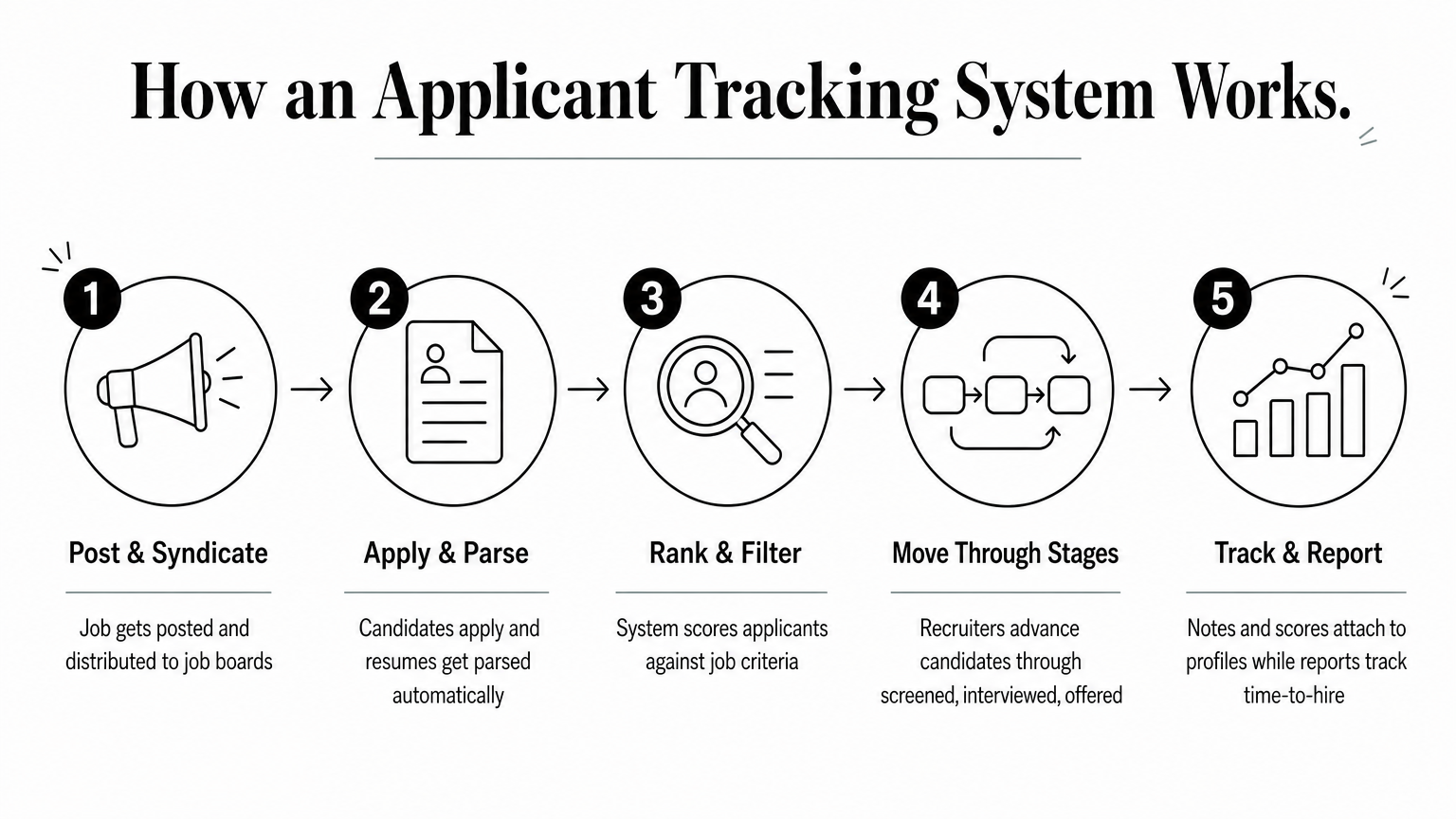
The core workflow
A recruiter creates a job posting inside the ATS, which distributes it to job boards and a careers page. Candidates apply, and the system pulls their resume data into structured fields through resume parsing, turning a PDF into searchable name, skill, and experience data. From there, the ATS ranks or sorts applicants, moves them through pipeline stages, and logs every recruiter note and interview outcome in one record.
- Job gets posted and syndicated to boards
- Candidates apply, resumes get parsed automatically
- System ranks or filters applicants against the job criteria
- Recruiters move candidates through stages like screened, interviewed, offered
- Notes, feedback, and interview scores attach to each profile
- Reports track time-to-hire and pipeline health
Parsing turns a pile of PDFs into searchable data, which is the step most teams underestimate until their database becomes unusable.
Where automation adds value
Beyond basic tracking, better systems layer in AI matching that scores candidates against a job description rather than just scanning for exact keywords. Some, including Olibr, extend this further with AI-powered video interviews that generate scored transcripts, letting recruiters screen at scale without sitting through every call live. That automation only works well if the underlying data was parsed and organized correctly in the first place.
Key features to look for in ATS software
Buying an applicant tracking system without a checklist is how teams end up paying for six overlapping tools, so it helps to see how the top ATS tools compare for recruiters first. Focus on what actually moves candidates through a pipeline, not what looks impressive in a sales demo.
Non-negotiable capabilities
Guess less and compare more by checking these against any vendor pitch:

| Feature | Why it matters |
|---|---|
| Resume parsing (PDF, DOCX, CSV) | Turns unstructured resumes into searchable candidate data |
| AI-based candidate ranking | Surfaces strong matches instead of relying on exact keywords |
| Customizable pipeline stages | Mirrors your actual hiring workflow, not a generic template |
| Team collaboration and notes | Keeps feedback attached to the candidate, not buried in email |
| Bulk upload support | Lets agencies migrate existing databases without manual entry |
| Job board integration | Distributes postings without a separate posting tool |
The best applicant tracking system is the one that eliminates three other subscriptions, not the one with the flashiest dashboard.
Features that separate good ATS from great ATS
Hiring teams often overlook role-based permissions, which matter once more than one recruiter touches the same requisition. Scoring transparency also counts: a system that ranks candidates should show why, not just spit out a number. Olibr builds these expectations into its free ATS, pairing pipeline tracking with AI matching and a shared candidate database so recruiters aren't stitching together separate tools to get the same result.
Free vs paid ATS options for hiring teams
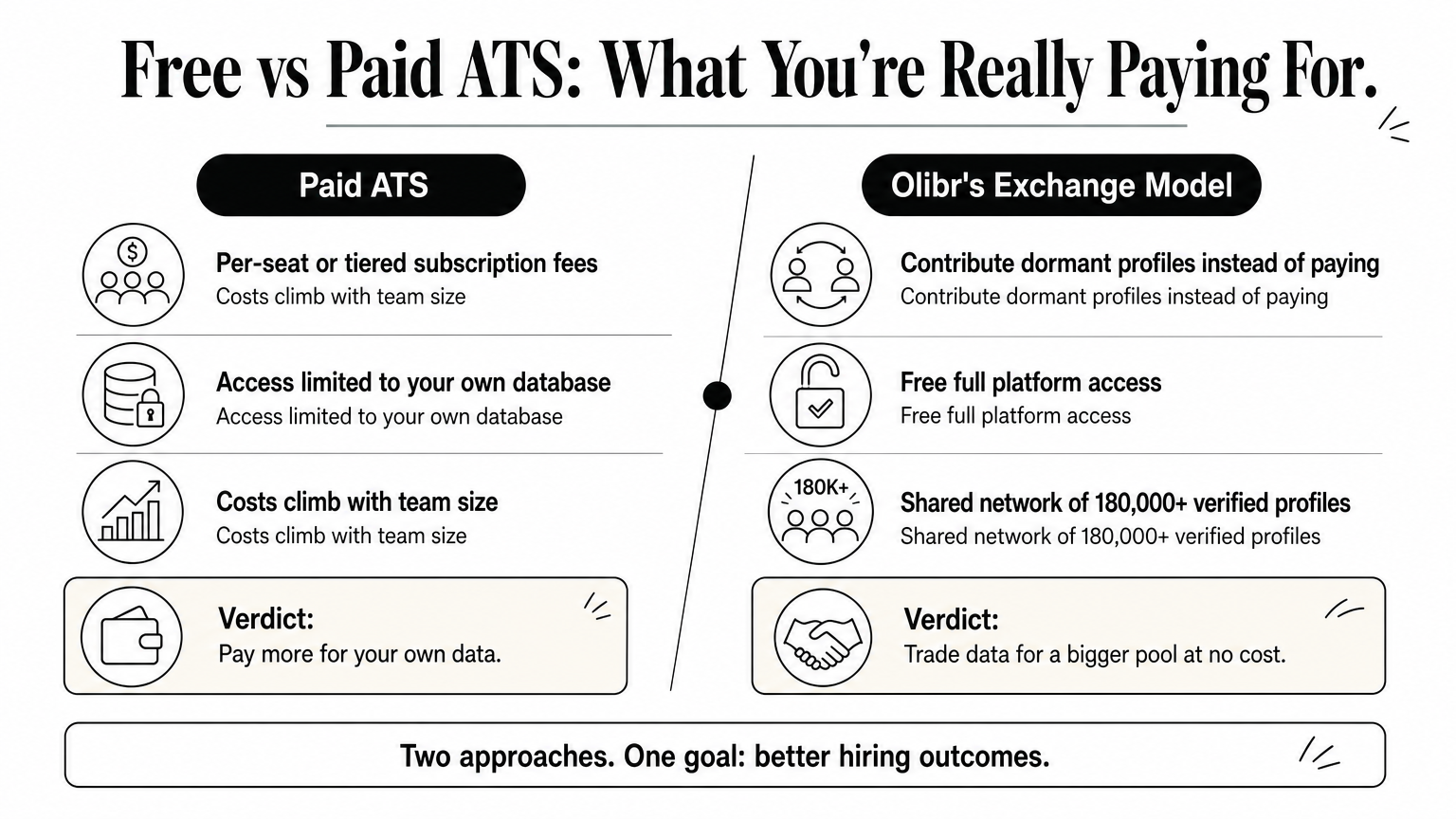
Price tags on applicant tracking system software range from zero to thousands of dollars a month, and the gap rarely maps to actual capability. Paid platforms bundle per-seat licensing, storage tiers, and add-on modules for parsing or AI matching, while free tools either strip out those features or fund themselves differently. Knowing which model you're actually paying for matters more than the sticker price alone.
What separates the pricing models
Subscription-based ATS vendors charge monthly or annual fees tied to seats, job postings, or candidate volume, and costs climb fast once an agency scales past a handful of recruiters. No-cost ATS platforms worth comparing split into two camps: stripped-down versions that upsell you into a paid tier, and data-exchange models like Olibr, where contributing dormant candidate profiles unlocks a shared pool of 180,000+ verified profiles plus the full platform at no cost.
| Model | Typical cost driver | Data access |
|---|---|---|
| Traditional paid ATS | Per-seat, per-job, or tiered subscription | Your own database only |
| Freemium ATS | Free tier with paid upgrades for AI or scale | Your own database only |
| Olibr's exchange model | Contribute dormant profiles instead of paying | Shared 180,000+ profile network |
Paying for an ATS often just means paying to access your own data faster, not paying for a bigger candidate pool.
Choosing based on your privacy needs
Retained search firms and NDA-bound recruiters often can't share candidate data at all, so Olibr's free ATS requires contributing candidate profiles.
Putting ATS knowledge into practice
Knowing the ats software full form is the easy part. What actually helps you hire faster is understanding that an ATS parses, ranks, and organizes candidates rather than silently rejecting them, and that most of the paid tools stacked around it exist to patch gaps a good system should already cover. Once you see that, the real question shifts from "what does ATS mean" to "why am I paying for four tools when one should do the job."
That is exactly the gap Olibr was built to close. You get a full applicant tracking system, resume parsing, AI matching, and access to a shared database of 180,000+ verified profiles, without a subscription tying up your budget. If you are still juggling spreadsheets or paying per seat for basic pipeline tracking, stop guessing and see it firsthand. Get a free recruiter account with full ATS access and start moving candidates through a real pipeline today.
For hiring teams
Search 180,000+ candidate profiles — free.
Olibr is a community-funded recruiting platform: full ATS, AI interviews, and a shared resume database. No per-seat fees.