
30 Vue.js Interview Questions and Answers to Know
Hiring a Vue.js developer sounds simple until you sit across from a candidate who can recite the documentation but can't explain reactivity under the hood. If you're building a vue js interview questions list to separate real skill from memorized answers, you need questions that test actual understanding, not just terminology. This list gives you both: the questions worth asking and the answers that show whether a candidate genuinely knows the framework.
This article walks through 30 vue js interview questions and answers, covering everything from the Composition API and reactivity system to component lifecycle, state management with Pinia, and performance optimization. Each question comes with a clear answer you can use to judge depth of knowledge, not just recall, so you spend less time guessing during a technical screen.
Whether you're a recruiter building a structured interview process for frontend roles or a hiring manager screening a shortlist, this guide gives you a repeatable framework. Pair it with tools like AI-scored video interviews to standardize evaluation across every Vue.js candidate you bring in.
1. Beginner Vue.js interview questions
Start every technical screen with the fundamentals. These five questions work like pre-screening questions with sample answers, separating candidates who've only skimmed a tutorial from those who've actually shipped a Vue app to production. Use them as a warm-up before moving into trickier territory.

What is Vue.js and why do teams choose it?
Ask this first and listen for whether the candidate mentions the progressive framework design, meaning you can adopt Vue incrementally, from sprinkling it onto a single page to building a full single-page application with routing and state management. A strong answer also touches on the virtual DOM, the reactivity system, and Vue's gentler learning curve compared to React or, as this detailed Angular vs Vue comparison shows, Angular. Candidates who've worked with it in production usually mention the Composition API introduced in Vue 3, single-file components (.vue files), and how the ecosystem (Vue Router, Pinia, Vite) ships as official, well-maintained tooling rather than a patchwork of third-party libraries.
A candidate who can explain why a team picked Vue over the alternatives, not just what Vue is, is the one worth moving forward.
What is a single-page application?
Expect the candidate to describe a single-page application (SPA) as a web app that loads one HTML shell and then swaps content dynamically using JavaScript, without full page reloads. Vue Router handles this by intercepting navigation and rendering different components based on the URL. A candidate who understands the tradeoffs will also mention the downsides: slower initial load, the need for client-side routing, and SEO challenges that often push teams toward server-side rendering or static generation for public-facing pages. If they can name Nuxt.js as Vue's answer to that problem, that's a good sign they've researched beyond the basics.
How do you create and register a Vue component?
This question tests whether someone actually writes Vue day to day or just talks about it. In Vue 3 with the Composition API, a basic single-file component looks like this:
<template>
  <button @click="increment">Count: {{ count }}</button>
</template>

<script setup>
import { ref } from 'vue'
const count = ref(0)
function increment() {
  count.value++
}
</script>
Registration then happens either globally, using app.component('MyButton', MyButton) in the main entry file, or locally, by importing the component directly into the parent that needs it. A candidate should know that local registration is the default recommendation for most projects, since global registration bloats the bundle with components that might never be used on a given page. Watch for whether they mention <script setup> syntax, since it's become the standard way to write components in modern Vue codebases.
What is the difference between one-way and two-way data binding?
One-way binding flows data in a single direction, typically from the component's state to the template, using interpolation like {{ message }} or the v-bind directive. Two-way binding, by contrast, syncs data in both directions, so a change in the UI updates the underlying state and vice versa. Vue implements this with the v-model directive, most commonly on form inputs. A candidate who understands it deeply should be able to explain that v-model on an input is really just syntactic sugar for binding value and listening for the input event, something worth confirming with a follow-up question.
| Binding type | Direction | Common syntax | Typical use case |
|---|---|---|---|
| One-way | State to template | {{ }}, v-bind |
Displaying computed values, labels |
| Two-way | State and template | v-model |
Form inputs, checkboxes, select fields |
Given this table, a good follow-up is asking the candidate to explain what happens under the hood when v-model is used on a custom component, which bridges naturally into the props and events section later in the interview.
What is a Vue instance and how do you create one?
Historically, every Vue application started with a Vue instance, created by calling new Vue({ ... }) in Vue 2, which held the root component's data, methods, and lifecycle hooks. In Vue 3, this changed to createApp({ ... }), which returns an app instance that you then mount to a DOM element with .mount('#app'). Candidates coming from older codebases might still describe the Vue 2 syntax, which isn't wrong, but it's worth probing whether they know the Vue 3 equivalent since most new hires will work in Vue 3 or Vue 3 with the Composition API. Someone who's genuinely current with the framework should be able to sketch out the difference without hesitation:
// Vue 2
new Vue({
  el: '#app',
  data: { message: 'Hello' }
})

// Vue 3
import { createApp } from 'vue'
createApp({
  data() {
    return { message: 'Hello' }
  }
}).mount('#app')
Running through these five questions in your first ten minutes tells you almost immediately whether a candidate has hands-on experience or is reciting concepts they read the night before. If they stumble here, there's little point spending the remaining forty minutes on advanced reactivity or performance tuning.
2. Vue.js directives and templating questions
Directives are where Vue candidates either show fluency or start guessing. These questions test whether someone understands the templating layer well enough to avoid the subtle bugs that show up in code review, not just after a production incident. Ask them in sequence and watch for candidates who can explain the reasoning, not just recite the syntax.
What are directives and which ones are used most often?
Directives are special attributes prefixed with v- that apply reactive behavior to the DOM. A strong candidate should rattle off the common ones without hesitation: v-bind for binding attributes, v-on for event listening, v-if and v-show for conditional rendering, v-for for list rendering, and v-model for two-way binding on form elements. They should also know the shorthand syntax, : for v-bind and @ for v-on, since almost every real Vue codebase uses the shorthand rather than the full directive name. If a candidate only knows the long-form syntax, that's a sign they've studied documentation more than actual production code.
What is the difference between v-if and v-show?
v-if removes and re-adds the element from the DOM entirely, while v-show keeps the element in the DOM and simply toggles its CSS display property. This difference has real performance implications that separate junior candidates from experienced ones.
| Directive | DOM behavior | Best for | Initial render cost |
|---|---|---|---|
| v-if | Adds/removes element | Content that toggles rarely | Lower if condition starts false |
| v-show | Toggles CSS display | Content that toggles frequently | Always renders, higher upfront |
If a candidate can't tell you when to reach for v-show over v-if based on toggle frequency, they haven't shipped enough UI to know the difference matters.
Why shouldn't you use v-if and v-for on the same element?
Combining v-if and v-for on the same element is a common anti-pattern that Vue's own style guide warns against. In Vue 2, v-for had higher priority, so the condition was evaluated inside the loop on every item, wasting cycles even when most items should be filtered out. Vue 3 reversed this priority, but it now throws an actual error if you try it, forcing developers to fix the pattern rather than silently accepting a performance hit. The correct approach is filtering the list with a computed property first, then looping over the already-filtered result with v-for, or wrapping the conditional element in a <template> tag with the v-if on the outer wrapper.
What is the purpose of the key attribute in v-for?
The key attribute gives Vue a stable identity for each item in a list, so its diffing algorithm can track which elements moved, changed, or got removed instead of re-rendering the entire list from scratch. Without a unique key, Vue falls back to reusing DOM nodes by position, which causes bugs in stateful components like form inputs, where the wrong input can end up holding the wrong value after a list reorders. Ask candidates directly whether using the array index as a key is acceptable. The honest answer is that it's fine for static lists that never reorder or filter, but it breaks down fast for anything dynamic, since indexes shift while the underlying data doesn't.
How do you bind classes and styles dynamically?
Vue supports binding classes and inline styles through object and array syntax on :class and :style, which is far cleaner than string concatenation. A candidate should be comfortable with something like :class="{ active: isActive, disabled: isDisabled }" for toggling classes based on state, or an array like :class="[baseClass, errorClass]" for combining multiple sources. For styles, the object syntax :style="{ color: activeColor, fontSize: size + 'px' }" shows they know how to bind computed values directly into inline styles without manually building style strings, which keeps templates readable as conditions stack up.
3. Component communication and props questions
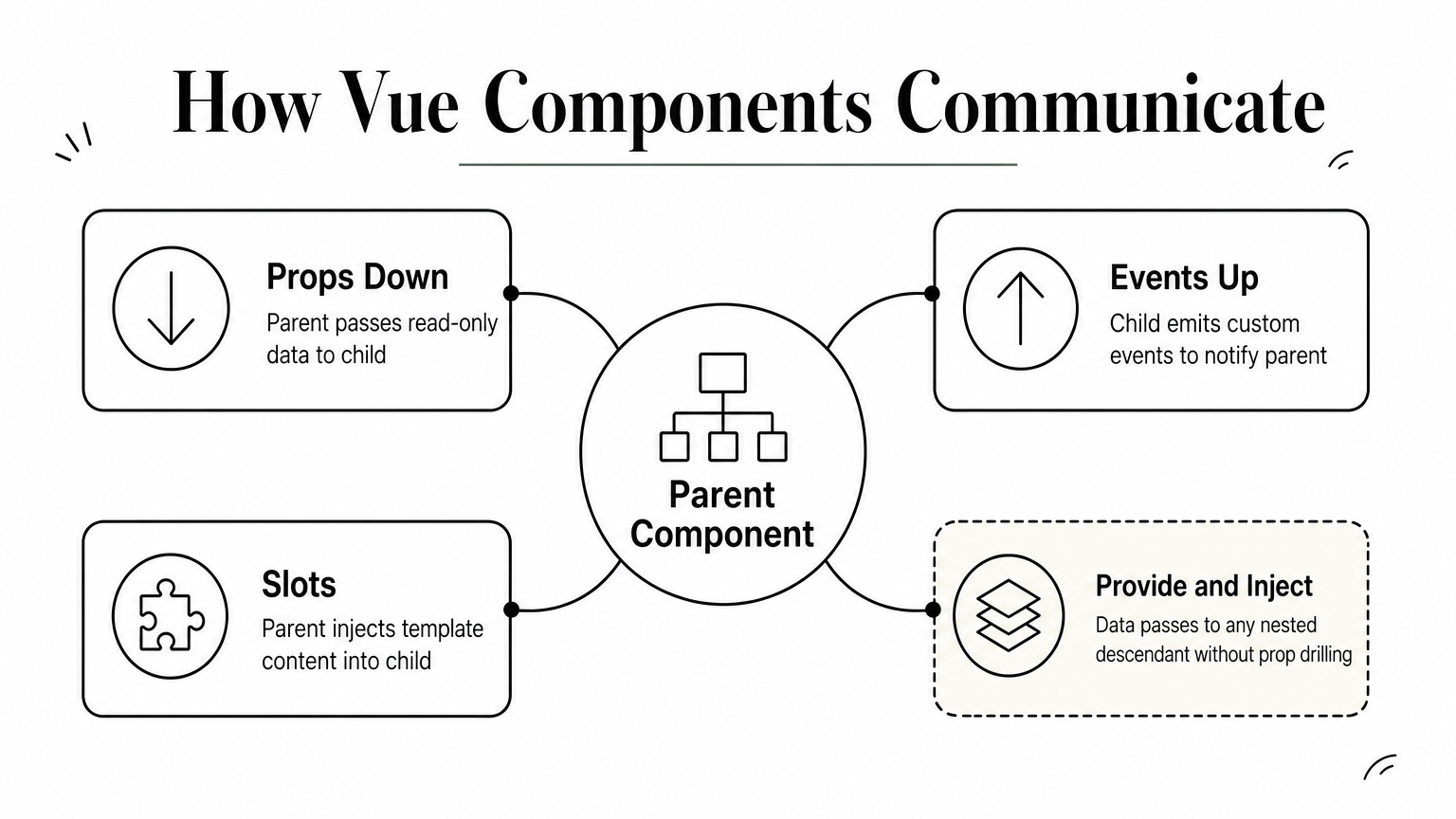
Components that can't talk to each other properly are the root cause of most messy Vue codebases. These vue js interview questions test whether a candidate builds clean data flow between parent and child components or reaches for global state as a crutch every time two components need to share information. Ask them in order, since each one builds on the last.
How do props work in Vue.js?
Props pass data one direction, from a parent component down to a child, and a well-trained candidate should immediately mention that props are read-only inside the child. Mutating a prop directly triggers a Vue warning in development, and for good reason: it breaks the predictable data flow that makes debugging manageable. The correct pattern is either emitting an event back up to the parent to request a change, or copying the prop into local state (via ref or a computed property) if the child needs its own derived version. In <script setup>, props are declared with defineProps, and a candidate should be comfortable writing either the array shorthand or the more explicit object syntax with types and defaults:
<script setup>
const props = defineProps({
  title: { type: String, required: true },
  count: { type: Number, default: 0 }
})
</script>
How do you emit custom events from a child component?
Children communicate upward by emitting custom events, declared with defineEmits and triggered with emit('event-name', payload). A strong candidate names the event in kebab-case, since Vue templates aren't case-sensitive in HTML attributes, and explains that the parent listens with @event-name just like a native DOM event. This is the mechanism underneath v-model, so if a candidate can trace how emitting and listening actually works, they've already done half the work toward the next question in this section.
A candidate who can explain props-down, events-up without prompting understands Vue's data flow model, not just its syntax.
What are slots and scoped slots?
Slots let a parent inject template content into a child component, rather than just data. A default slot is the simplest form, useful for wrapping arbitrary markup inside a card or modal component. Named slots go further, letting a parent target specific placeholders inside the child, like a header and footer slot in the same component. Scoped slots take this a step further by letting the child pass data back up into the slot content itself, which is the pattern behind reusable list or table components where the parent controls rendering but the child controls the underlying data:
<!-- Child -->
<slot name="item" :row="currentRow" />

<!-- Parent -->
<template #item="{ row }">
  <span>{{ row.name }}</span>
</template>
What is provide/inject and when should you use it?
provide and inject let a component pass data down to any descendant, no matter how deeply nested, without threading props through every layer in between. This solves the prop-drilling problem, where an intermediate component has to accept and forward a prop it never actually uses itself. A good candidate flags the tradeoff too: provide/inject makes data flow harder to trace, since the source isn't obvious from reading a deeply nested component alone, so it's best reserved for cross-cutting concerns like theming or localization rather than everyday parent-child communication.
How does v-model work on a custom component?
On a custom component, v-model is syntactic sugar for binding a modelValue prop and listening for an update:modelValue event, a pattern that generalizes to named model bindings like v-model:title in Vue 3. Candidates who've built custom form inputs, like a styled dropdown or a toggle switch, should be able to walk through wiring this up without hesitation:
<script setup>
defineProps(['modelValue'])
defineEmits(['update:modelValue'])
</script>
<template>
  <input :value="modelValue" @input="$emit('update:modelValue', $event.target.value)" />
</template>
Someone who can explain this cold has almost certainly built a real component library, not just consumed one.
4. Reactivity and lifecycle hook questions
Reactivity is Vue's core selling point, and it's also where candidates most often fake understanding. These vue js interview questions push past the surface-level "Vue updates the DOM automatically" answer and test whether someone actually knows the mechanism, along with when to reach for the right lifecycle hook. This is usually where weaker candidates start to slow down.
How does Vue's reactivity system work under the hood?
Vue 3 rebuilt its reactivity system around JavaScript Proxies, replacing the Object.defineProperty approach from Vue 2, so it's worth pairing this with a few advanced JavaScript questions on proxies and closures. A Proxy wraps a reactive object and intercepts get and set operations, letting Vue track which components read which properties (dependency tracking) and trigger re-renders only for the components that actually depend on the changed value. This fixed real limitations from Vue 2, like the inability to detect new properties added to an object after initialization, or array index and length changes, without special workarounds. A candidate who can explain the getter/setter interception, not just say "it's reactive because Vue makes it reactive," has actually read the source or the Vue.js reactivity documentation rather than just the quickstart guide.
If a candidate can't explain why Vue 3 switched to Proxies, they're describing behavior they've observed, not a system they understand.
What is the difference between computed and watch?
computed derives a cached value from reactive dependencies and only recalculates when one of those dependencies changes, making it ideal for transforming data for display, like formatting a full name from first and last name refs. watch, on the other hand, runs a side effect in response to a change, such as calling an API when a search input updates or syncing a value to local storage. The rule of thumb worth listening for: if you're returning a value to use in the template, reach for computed; if you're triggering an action outside the reactive system, reach for watch. Candidates who reach for watch to do what computed should do usually end up with unnecessary re-renders and harder-to-follow code.
What is the difference between ref and reactive in Vue 3?
ref wraps a value in an object with a .value property, working for primitives and objects alike, while reactive only works on objects and arrays and doesn't need the .value unwrapping inside script code. The catch worth probing: reactive loses its reactivity if you destructure it, since destructuring breaks the Proxy reference, whereas ref values keep working correctly when passed around because the reactivity lives on the wrapper object itself.
| Feature | ref | reactive |
|---|---|---|
| Works with primitives | Yes | No |
| Access in script | .value required |
Direct property access |
| Access in template | Auto-unwrapped | Direct property access |
| Destructuring safe | Yes | No, breaks reactivity |
What are the key lifecycle hooks in Vue 3?
Options API hooks like mounted and beforeDestroy still exist, but the Composition API equivalents, onMounted, onUpdated, and onUnmounted, are what most modern codebases use. onMounted fires once the component is inserted into the DOM, making it the right place for API calls or DOM measurements. onUnmounted is where you clean up: removing event listeners, clearing intervals, or canceling subscriptions to avoid memory leaks. A candidate who's shipped real features should mention cleanup unprompted, since forgetting it is one of the most common bugs in production Vue apps.
What is the purpose of nextTick()?
Vue batches DOM updates for performance, so changing a reactive value doesn't update the DOM synchronously. nextTick() returns a promise that resolves after the next DOM update cycle completes, which matters when you need to measure an element's size or focus an input right after it becomes visible. A candidate who's hit this bug in real code will describe a scenario like toggling v-if to show a new input and then immediately calling .focus() on it, only to find the element isn't in the DOM yet without wrapping the call in nextTick().
5. Vue Router, state management, and API questions
Modern Vue apps rarely live in a single component. These vue js interview questions test whether a candidate can wire together routing, shared state, and network calls without creating a tangled mess that breaks the moment the app grows past a handful of pages. Anyone applying for a mid-level or senior role should move through these without much hesitation.

What is Vue Router and how do navigation guards work?
Vue Router is the official routing library for Vue, mapping URL paths to components and handling navigation without full page reloads. A candidate should describe the basic setup, defining routes with a path and component, then mounting <router-view> where matched components render. Navigation guards are where depth shows: beforeEach runs globally on every route change, useful for auth checks, while beforeEnter scopes the same logic to a single route. In-component guards like beforeRouteLeave handle cases like warning a user about unsaved form changes before they navigate away. A candidate who can explain guard execution order, global, then per-route, then in-component, has actually debugged a routing issue in production.
What is Pinia and how does it compare to Vuex?
Pinia replaced Vuex as the recommended state management library for Vue, and most new projects use it exclusively. It drops Vuex's mutations entirely, letting actions modify state directly, and it works natively with the Composition API without extra boilerplate like module namespacing.
| Feature | Vuex | Pinia |
|---|---|---|
| Mutations required | Yes | No |
| TypeScript support | Limited | Built in |
| Devtools support | Yes | Yes, improved |
| API style | Options-based | Composition-friendly |
| Official status | Legacy | Recommended |
A candidate still defending Vuex for a new project in 2026 hasn't kept up with where the ecosystem moved.
A strong answer also mentions that Pinia stores feel like composables, since a store is just a function returning reactive state, getters, and actions, which makes them easier to test in isolation.
How do you fetch data and handle async operations in Vue?
Data fetching typically happens in onMounted using fetch or axios, paired with reactive state for loading and error flags so the UI can respond to each stage of the request. Candidates should mention handling the loading state explicitly rather than assuming data arrives instantly, since skipping this leads to flashes of empty content or broken layouts. A well-structured example looks like this:
const data = ref(null)
const loading = ref(true)
const error = ref(null)

onMounted(async () => {
  try {
    const res = await fetch('/api/candidates')
    data.value = await res.json()
  } catch (err) {
    error.value = err
  } finally {
    loading.value = false
  }
})
Experienced candidates often extract this pattern into a reusable composable, which naturally leads into the next section on composables.
How do you keep URL state and application state in sync?
Keeping filters, search terms, or pagination in the URL query string lets users bookmark or share a specific view, and it's a detail that separates thoughtful candidates from ones who only think in terms of component state. Vue Router exposes route.query for reading URL parameters and router.push for updating them, and a candidate should know to watch the route object so the component reacts when the URL changes outside of a direct user click, like a back-button navigation. Storing this kind of state only in a Pinia store, without reflecting it in the URL, works fine for internal tools but fails any product where shareable links matter.
How do you handle errors and exceptions in a Vue app?
Vue provides onErrorCaptured as a component-level hook for catching errors thrown by child components, and a global app.config.errorHandler for catching anything that slips through, both worth mentioning together. Beyond the framework hooks, a candidate should talk about wrapping API calls in try/catch blocks, showing meaningful error states in the UI instead of a blank screen, and logging errors to a monitoring service in production. Someone who's only ever built demo apps tends to skip this question entirely or assume errors simply don't happen.
6. Advanced Vue.js and performance questions
Senior candidates should be comfortable talking about tradeoffs, not just features. These final vue js interview questions separate developers who've optimized a real production app under load from those who've only worked on small projects where performance never became a problem. Use this section to gauge whether someone can be trusted with architecture decisions, not just component code.
How do you optimize the performance of a large Vue application?
Large Vue apps slow down for predictable reasons, and a strong candidate should list several fixes without prompting: lazy loading routes with dynamic imports so the initial bundle stays small, using v-once for content that never changes after the first render, and reaching for shallowRef or shallowReactive when deep reactivity on large objects isn't needed. Virtual scrolling for long lists comes up often too, since rendering thousands of DOM nodes at once tanks performance regardless of how efficient the reactivity system is underneath. A candidate who mentions checking the Vue Devtools performance tab or the browser's own profiler before guessing at a fix shows they debug methodically instead of applying random optimizations.
Optimization without measurement is guessing, and a candidate who profiles before fixing is the one you want on a production incident.
What is server-side rendering and why does it matter?
Server-side rendering (SSR) generates the initial HTML on the server before sending it to the browser, rather than shipping an empty shell that JavaScript fills in later. This matters for two concrete reasons: faster first contentful paint, since users see content before JavaScript finishes downloading and executing, and better SEO, since search engine crawlers can index rendered content directly instead of relying on JavaScript execution. Nuxt.js is Vue's official framework for this, handling routing, data fetching, and hydration out of the box. A candidate should also mention hydration, the process where Vue attaches interactivity to the server-rendered HTML on the client, and flag hydration mismatches as a common bug when server and client render different content.
What are composables and how do you build one?
Composables are functions that encapsulate reusable reactive logic, named by convention with a use prefix like useFetch or useDebounce. They're the Composition API's answer to mixins, without the naming collisions and unclear data sources that made mixins hard to maintain in Vue 2. A candidate should be able to sketch a simple one on the spot:
import { ref } from 'vue'

export function useCounter(initial = 0) {
  const count = ref(initial)
  function increment() { count.value++ }
  function decrement() { count.value-- }
  return { count, increment, decrement }
}
Someone who's extracted real logic into composables, not just copied the pattern from a tutorial, usually mentions returning refs directly rather than plain values, so reactivity survives when the composable's return value gets destructured in the consuming component.
How do you test Vue components effectively?
Testing typically happens at two levels: unit tests with Vitest or Jest for logic in composables and utility functions, and component tests with Vue Test Utils for mounting components and asserting on rendered output or emitted events. A candidate should mention testing behavior, like what a component renders given certain props or what it emits after a user interaction, rather than testing implementation details that break every time the internal structure changes. End-to-end tools like Cypress or Playwright round this out for testing full user flows across pages, which matters most for critical paths like checkout or signup.
What are common Vue.js performance mistakes to avoid?
The recurring mistakes worth listing out loud: using array index as a key in dynamic lists, overusing watch for things computed should handle, forgetting to clean up event listeners in onUnmounted, and making reactive objects unnecessarily deep when shallowRef would do. Another common one is fetching data inside a component that renders on every route change instead of caching it in a Pinia store. A candidate who can name these mistakes from experience, not from a checklist, has clearly been the one debugging them at 2 a.m.
Getting interview-ready with Vue.js
Thirty questions won't turn a weak candidate into a strong one, but they will expose the gap between someone who's read the docs and someone who's shipped Vue in production. Use these questions as a baseline, then let follow-up questions probe deeper wherever a candidate's answer feels rehearsed rather than lived-in. The candidates worth hiring are the ones who volunteer tradeoffs and war stories without being asked twice.
Getting the questions right is only half the job. You still need a reliable way to source Vue.js talent, screen them at scale, and keep your pipeline organized without juggling five different tools. If you're hiring for frontend roles beyond Vue, from React to Node.js, find Vue.js developers by skill, experience, and location and start shortlisting today, no credit card required.
For engineers
Find work worth your time.
Live engineering roles across India and the US, matched to your stack. Build a profile recruiters actually discover.