30 SQL Server Interview Questions and Answers to Know
Hiring a database administrator or backend developer, or looking to hire vetted MS SQL developers, means you need to know if a candidate can actually work with SQL Server, not just talk about it. If you're building out a technical interview and searching for interview questions about sql server, you already know generic technical interview question banks and prep guides rarely test real skill. You need questions that separate candidates who've memorized syntax from those who understand indexing, transactions, and query performance under load.
This list gives you 30 SQL Server interview questions and answers covering everything from basic joins to advanced topics like deadlocks, isolation levels, and stored procedure optimization. Each question includes a clear answer so you can quickly judge whether a candidate's response holds up, even if you're not a database expert yourself. That makes it useful whether you're screening juniors or vetting senior candidates for a lead DBA role.
We've organized the questions by difficulty, moving from fundamentals to scenarios experienced engineers face daily. If you're building a structured interview panel, want to know how to run remote interviews well, or just need a reliable reference for your next round of technical screens, this guide gives you the questions worth asking and the answers worth expecting.
1. SQL Server basics and features
Before you dig into deadlocks or execution plans, confirm the candidate actually understands what SQL is and how databases work, what SQL Server is specifically, and why organizations choose it over other database engines. This is the warm-up round, but don't skip it. A surprising number of candidates who list SQL Server on their resume struggle to name more than two or three real features, which tells you their experience is shallower than it looks on paper.
What are the features of SQL Server?
Asking this question upfront filters out candidates who've only worked with SQL Server as an afterthought. A strong answer should cover high availability, security, and scalability without prompting, since these are the features that actually matter in production environments. Look for candidates who can name specifics rather than buzzwords.
- Always On Availability Groups for failover and disaster recovery
- Transparent Data Encryption (TDE) and row-level security for compliance
- In-Memory OLTP for high-throughput transactional workloads
- Columnstore indexes for fast analytical queries on large datasets
- Built-in reporting and analysis services (SSRS, SSAS) for BI teams
- Query Store for tracking query performance history over time
A candidate who can name specific SQL Server features and explain why each one matters knows the product; one who only lists generic database terms probably doesn't.
If a candidate can also explain when they'd reach for one feature over another, for example choosing In-Memory OLTP for a high-frequency trading table but skipping it for a reporting table, that's a strong signal of hands-on experience rather than textbook knowledge.
What are the main components of SQL Server?
This question tests whether the candidate understands the platform beyond writing queries. The Database Engine handles storage, processing, and security, and it's the core component most developers interact with daily. Beyond that, SQL Server ships with SQL Server Agent for job scheduling, Integration Services (SSIS) for ETL workflows, Analysis Services (SSAS) for OLAP and data mining, and Reporting Services (SSRS) for building and distributing reports.
Candidates applying for DBA roles should also mention the Master, Model, MSDB, and TempDB system databases, since understanding these is essential for backup strategy, maintenance planning, and troubleshooting. If a candidate can't distinguish between these components, they've likely only ever used SQL Server through an application layer without touching the server itself, which matters a lot for infrastructure-focused roles.
2. Primary keys, identity columns, and constraints
Constraints questions reveal whether a candidate understands data integrity or just knows how to insert rows without errors. These interview questions and answers on SQL Server topics come up in nearly every technical round because primary keys and identity columns touch almost every table design decision a developer makes.
What is a primary key and how is it different from a unique key?
A primary key uniquely identifies each row in a table and enforces NOT NULL by default, while a unique key allows one NULL value and doesn't automatically become the clustering key. Both prevent duplicate values, but candidates should know that a table can have only one primary key versus multiple unique keys. Strong candidates mention that the primary key typically backs the clustered index unless you explicitly define otherwise, which affects how SQL Server physically stores the data.
| Feature | Primary Key | Unique Key |
|---|---|---|
| NULL values | Not allowed | One NULL allowed |
| Count per table | Only one | Multiple allowed |
| Default index type | Clustered | Non-clustered |
If a candidate can't explain why a primary key defaults to a clustered index, they haven't designed a schema under real performance constraints.
What is an identity column and how does it work?
Generating sequential values automatically, an identity column removes the need for manual key assignment during inserts. You define it with a seed and increment value, like IDENTITY(1,1), meaning the first row gets 1 and each subsequent row increases by 1. Watch for candidates who understand that identity values can have gaps after failed transactions or deletions, since this trips up developers who assume identity columns guarantee perfectly sequential, gapless numbering. A candidate who's dealt with replication or bulk imports should also mention IDENTITY_INSERT, which allows explicit values to be inserted when needed, such as during data migration.
3. Indexes and how they affect performance
Query performance separates candidates who understand SQL Server from those who've only used it. Indexes come up in nearly every interview questions and answers on SQL Server session because they're the single biggest lever for speeding up reads, and a candidate who can't explain how they work will struggle the moment a query takes 30 seconds instead of 300 milliseconds.

What is an index and why does it matter for query speed?
Think of an index as a sorted lookup structure that lets SQL Server find rows without scanning the entire table. Without one, every query triggers a full table scan, which gets slower as the table grows. A strong candidate explains that indexes speed up SELECT statements but slow down INSERT, UPDATE, and DELETE operations, because the index itself needs updating too. Look for candidates who mention covering indexes, where all the columns a query needs exist in the index itself, avoiding an extra lookup to the base table entirely.
An index that isn't chosen by the query optimizer is worse than no index at all, since it still costs write performance without paying off in reads.
What is the difference between a clustered and non-clustered index?
Storing data determines the difference here. A clustered index physically sorts and stores the table's rows in index order, meaning a table can have only one. A non-clustered index creates a separate structure with pointers back to the actual data, so a table can have many.
| Feature | Clustered Index | Non-Clustered Index |
|---|---|---|
| Count per table | One | Multiple (up to 999) |
| Data storage | Sorts actual table data | Separate structure with pointers |
| Best for | Range queries, primary key lookups | Specific column searches, covering queries |
Candidates who've tuned production databases usually bring up the tradeoff between too many non-clustered indexes and slower write throughput without needing to be asked.
4. Stored procedures and user-defined functions
Moving past table design, this section checks whether a candidate can package logic inside SQL Server instead of pushing everything into application code. Stored procedures and user-defined functions show up constantly in real-world interview questions and answers of SQL Server, as well as in SQL and PL/SQL interview question sets, because most production systems lean on both for performance and maintainability.
What is a stored procedure and what are its benefits?
Grouping one or more T-SQL statements into a single callable unit, a stored procedure runs on the server instead of sending raw queries over the network each time. Benefits candidates should mention include reduced network traffic, since only the procedure call travels across the wire, and execution plan caching, which speeds up repeated calls after the first compile. Security is another selling point: granting execute permission on a procedure avoids giving direct table access, which matters in multi-tenant or compliance-heavy environments.
A candidate who only says "stored procedures are faster" without explaining plan caching or reduced round trips is guessing, not explaining.
Strong candidates also bring up parameterization for preventing SQL injection, and the ability to wrap multiple statements in a single transaction for atomic updates.
What is a user-defined function and when should you use one?
Returning a single value or a table, a user-defined function (UDF) behaves differently from a stored procedure in a few key ways: it can be used inline within a SELECT statement, but it can't perform data modification or manage transactions. Scalar functions return one value, while table-valued functions return a result set you can join against like a regular table. Candidates worth hiring know that scalar UDFs called row-by-row can tank performance on large datasets, since SQL Server often can't parallelize them the way it does set-based operations, so they'll reach for inline table-valued functions instead whenever reusability and speed both matter.
5. Triggers and automated jobs
Moving from logic you call explicitly to logic that fires on its own, this section checks whether a candidate understands automation inside SQL Server itself. Triggers and scheduled jobs handle work nobody wants to remember to run manually, and candidates who've maintained production systems, including those who've answered 30 PL/SQL questions on triggers and procedural code, usually have a strong opinion about when to use each.
What is a trigger and when does it fire?
A trigger is a special stored procedure that executes automatically in response to a data change or server event, rather than being called directly. Candidates should distinguish between the two main types:
- AFTER triggers, which run once the triggering action (INSERT, UPDATE, DELETE) completes, commonly used for auditing or enforcing complex business rules
- INSTEAD OF triggers, which override the triggering action entirely, often used on views to make otherwise non-updatable views editable
Strong candidates mention the inserted and deleted virtual tables, which hold the affected rows and let the trigger logic compare old and new values.
A trigger that silently modifies data without logging what changed is a debugging nightmare waiting to happen.
Watch for candidates who flag the risk of nested or recursive triggers causing unexpected cascading updates, since that's a real production hazard, not a textbook concern.
How does SQL Server Agent automate recurring tasks?
Unlike triggers, which react to events, SQL Server Agent runs scheduled jobs on a timer, handling backups, index maintenance, and ETL steps without a human kicking them off. A candidate should be able to describe creating a job with multiple steps, each with its own success or failure path, plus alerts that notify a DBA when a job fails. Experienced candidates also bring up job history and the msdb database, where Agent stores schedules, job definitions, and execution logs, since troubleshooting a failed nightly job always starts there.
6. Joins and subqueries
Joins and subqueries test whether a candidate thinks in sets or still writes procedural loops disguised as SQL. This is one of the most common interview questions in SQL server rounds, and it also anchors most analytics-focused SQL question lists, because almost every real query touches multiple tables, and how a candidate combines them reveals a lot about their query-writing habits.
What are the different types of joins in SQL Server?
Combining rows from two or more tables based on a related column, joins come in several flavors that candidates should rattle off without hesitation:
| Join Type | Returns |
|---|---|
| INNER JOIN | Only matching rows from both tables |
| LEFT JOIN | All rows from the left table, matched rows from the right |
| RIGHT JOIN | All rows from the right table, matched rows from the left |
| FULL OUTER JOIN | All rows from both tables, matched or not |
| CROSS JOIN | Every combination of rows from both tables |
Experienced candidates also mention self joins, useful for comparing rows within the same table, such as finding employees who share a manager.
A candidate who defaults to INNER JOIN without asking whether unmatched rows matter hasn't thought through the business requirement yet.
When do you need a subquery instead of a single SELECT?
Nesting one query inside another becomes necessary when you need a value or result set that doesn't exist until an earlier step runs, like filtering orders against a dynamically calculated average. Subqueries can appear in the WHERE, FROM, or SELECT clause, and candidates should distinguish between correlated subqueries, which reference the outer query and run once per row, versus non-correlated subqueries, which run independently. Strong candidates flag that correlated subqueries often perform worse than an equivalent JOIN or a common table expression, and they'll rewrite one when performance matters.
7. Views versus indexed views
Views questions separate candidates who treat SQL Server as a simple query wrapper from those who understand how the engine physically stores data. This topic comes up often in interview questions and answers for SQL Server because views look identical on the surface, but a standard view and an indexed view behave completely differently under load.
What is the difference between a standard view and an indexed view?
A standard view is just a stored SELECT statement. It doesn't store data itself, it re-runs the underlying query every time you reference it, so performance depends entirely on how well the base tables are indexed. An indexed view, on the other hand, actually materializes the result set on disk by creating a unique clustered index on it, meaning SQL Server maintains physical data rather than recalculating it each time.
| Feature | Standard View | Indexed View |
|---|---|---|
| Data storage | None, re-runs query | Materialized on disk |
| Write overhead | None | Higher, index updates on writes |
| Best for | Simplifying complex joins | Aggregations on large, stable tables |
A view that recalculates the same aggregation on every call isn't saving anyone time; it's just hiding the cost behind a friendlier name.
Candidates should also mention that indexed views come with strict requirements, like deterministic functions only and SCHEMABINDING, which prevents underlying tables from changing structure without dropping the index first.
When should you materialize a view for performance?
Reaching for an indexed view makes sense when a query aggregates or joins large, relatively static tables repeatedly, such as a reporting dashboard pulling daily sales totals. Otherwise the write penalty outweighs any read benefit. Strong candidates flag that indexed views shine in Enterprise Edition, where the optimizer can use them automatically even without directly referencing the view name, something worth probing if you're hiring for a reporting-heavy role.
8. Transactions and isolation levels
Transaction questions test whether a candidate understands what happens when things go wrong, not just when everything works. Anyone can write a query that succeeds on the first try; fewer candidates can explain what SQL Server does when a transfer fails halfway through, or when two users hit the same row at once. This section belongs in almost every set of interview questions and answers on SQL Server for experienced candidates, much like the advanced MySQL question set on transactions and locking, since junior developers rarely deal with concurrency bugs directly.
What are the ACID properties and why do transactions need them?
Every transaction should guarantee Atomicity, Consistency, Isolation, and Durability. Atomicity means all statements in a transaction succeed or none do, so a failed step rolls back the whole batch instead of leaving half-finished data. Consistency ensures the database moves from one valid state to another, respecting constraints and triggers along the way. Isolation controls how much one transaction can see of another's uncommitted changes, and Durability guarantees that once SQL Server commits a transaction, it survives a crash.
A transaction that isn't atomic isn't really a transaction, it's just a batch of statements hoping for the best.
How do REPEATABLE READ and SNAPSHOT isolation differ?
Locking behavior is where these two isolation levels split. REPEATABLE READ locks the rows it reads until the transaction finishes, blocking other writers but preventing phantom changes to those specific rows. SNAPSHOT isolation instead uses row versioning, giving each transaction a consistent view of data as it existed at the start, without blocking readers or writers. Candidates who've tuned high-concurrency systems usually prefer snapshot isolation for reporting workloads, since it avoids blocking, but they should also flag the extra load on tempdb that row versioning creates.
9. Temporary tables and table variables
Often candidates confuse temporary tables and table variables because both hold intermediate results, but they behave differently under the hood, and that distinction matters once a query starts processing millions of rows. This is a favorite among interview questions and answers of SQL Server because it exposes whether a candidate has actually profiled queries or just picked whichever option compiled first.
What is the difference between a temporary table and a table variable?
Storing data in tempdb, a temporary table (prefixed with #) behaves almost like a regular table: it supports indexes, constraints, and statistics, which helps the optimizer make better decisions on larger datasets. A table variable (declared with @) also lives in tempdb but carries less overhead for small operations, since SQL Server doesn't generate statistics for it the same way, which can lead to poor execution plans when row counts are underestimated.
| Feature | Temporary Table | Table Variable |
|---|---|---|
| Statistics | Generated | Not generated (pre-2019) |
| Scope | Session or procedure | Batch or procedure only |
| Indexes | Supports most index types | Limited, primary key/unique only |
| Transaction rollback | Rolled back with transaction | Not rolled back |
A table variable that skips statistics generation can quietly wreck a query plan the moment row counts grow past a few hundred.
When would you choose one over the other?
Small lookup sets or quick row staging inside a stored procedure usually favor table variables, since they avoid recompilation and keep overhead low. Larger datasets, especially ones needing indexes or where the optimizer needs accurate row estimates, call for temporary tables instead. Candidates who've hit performance walls in production usually mention that table variables aren't affected by transaction rollbacks, which occasionally matters for logging attempts even when the surrounding transaction fails.
10. Writing efficient T-SQL queries
Query-writing questions show you whether a candidate reaches for the simplest working solution or the one that scales. This is where interview questions and answers on SQL Server for experienced candidates start to separate real production experience from tutorial-level knowledge, since both questions below come up constantly in reporting and data-sync work.
How do you retrieve the top N rows within each group?
Grabbing the top result per category, like the highest-paid employee in each department, calls for a window function rather than a correlated subquery. Strong candidates reach for ROW_NUMBER() partitioned by the group column, then filter to row number 1 in an outer query or CTE:
SELECT *
FROM (
  SELECT *, ROW_NUMBER() OVER (PARTITION BY DepartmentID ORDER BY Salary DESC) AS rn
  FROM Employees
) ranked
WHERE rn = 1;
A candidate who solves top-N-per-group with a correlated subquery instead of a window function is writing SQL like it's 2005.
Watch for candidates who mention RANK() or DENSE_RANK() as alternatives when ties should share a position instead of arbitrarily picking one row.
How does the MERGE statement simplify data synchronization?
Running insert, update, and delete logic in one pass, MERGE compares a source and target table, then applies the right action per row based on whether a match exists. It's a staple in ETL jobs and incremental data loads, where writing three separate statements would mean three separate table scans. Candidates should flag the well-known gotcha: MERGE needs careful handling of concurrent writes, since race conditions have caused real bugs in production, and Microsoft's own documentation recommends explicit locking hints in high-concurrency scenarios. A candidate who brings this up unprompted has likely debugged a MERGE statement gone wrong at 2 a.m.
11. CTEs and window functions
Common table expressions and window functions show up in nearly every modern SQL Server interview questions and answers session, since both replace clunky procedural workarounds with set-based logic. Candidates who reach for cursors when a window function would do are usually stuck thinking in loops instead of sets, and that habit costs performance the moment row counts climb.
When should you use a recursive CTE?
Building hierarchical data, like an org chart or a bill of materials, calls for a recursive CTE because it lets a query reference itself, walking up or down a tree one level at a time. The structure needs an anchor member that returns the starting rows, plus a recursive member that joins back to the CTE until no more rows match. Strong candidates mention MAXRECURSION, the safety option that stops runaway queries from looping forever when a hierarchy accidentally contains a cycle.
A recursive CTE without a MAXRECURSION limit is one bad data row away from an infinite loop.
How does ROW_NUMBER() help solve ranking problems?
Assigning a unique sequential number to each row within a partition, ROW_NUMBER() solves problems that used to require self-joins or nested subqueries, like finding duplicates or paginating results. Candidates should know it differs from RANK() and DENSE_RANK() in how it handles ties: ROW_NUMBER() always breaks ties arbitrarily, while the other two let tied rows share a rank. Look for candidates who've used ROW_NUMBER() for deduplication, since a classic pattern deletes duplicate rows by partitioning on the columns that define a duplicate, then removing everything except row number 1. That combination of a CTE and a window function is one of the most practical patterns in real-world data cleanup work.
12. Reading execution plans and tuning performance
Performance tuning questions reveal whether a candidate can diagnose a slow query or just knows how to write one that eventually returns results. This is where sql server interview questions and answers for experienced candidates should shine, since reading execution plans is a daily habit for anyone who's owned production performance issues.
How do you use an execution plan to spot bottlenecks?
Every query SQL Server runs has an underlying plan showing how the optimizer chose to retrieve data, and reading it is the fastest way to find why a query is slow. Candidates should know how to pull up an actual execution plan in SSMS and look for warning signs like table scans on large tables, missing index suggestions, or operators with a disproportionately high relative cost. Strong candidates specifically mention comparing estimated rows versus actual rows, since a big gap there usually points to stale statistics.
A query plan full of scans instead of seeks is telling you exactly where to add an index, if you bother to read it.
Watch for candidates who bring up key lookups, which happen when a non-clustered index doesn't cover all requested columns, forcing an extra trip back to the clustered index for each row.
What is parameter sniffing and how do you manage it?
Caching a plan based on the first parameter value passed in, SQL Server sometimes reuses that same plan for wildly different parameter values, and that's parameter sniffing. It causes real problems when a query runs fast for common values but slow for rare ones, because the cached plan was optimized for the wrong data distribution. Candidates who've fixed this in production usually mention OPTION (RECOMPILE), local variables to block sniffing entirely, or query hints like OPTIMIZE FOR, and they should explain the tradeoff each option carries between compile overhead and plan stability.
13. Locking, blocking, and deadlocks
Concurrency questions expose whether a candidate has actually debugged a production incident at 2 a.m. or only read about locking in a textbook. Anyone can write a query that works alone; fewer candidates can explain why that same query grinds to a halt when ten users hit the same table at once. This topic shows up constantly in interview questions and answers on SQL Server for experienced hires, since junior developers rarely get paged for blocking issues.

What does NOLOCK do and what risks does it introduce?
Bypassing shared locks entirely, the NOLOCK hint lets a SELECT read data even while another transaction is modifying it, which speeds things up but introduces dirty reads. A candidate should explain that this means reading uncommitted, possibly rolled-back data, and in rare cases even skipping or duplicating rows during a page split. Strong candidates reach for READ COMMITTED SNAPSHOT instead when they want to avoid blocking without risking dirty reads.
Reaching for NOLOCK to fix a slow query is treating a performance problem with a correctness workaround.
How do you identify and resolve deadlocks in SQL Server?
Occurring when two transactions each hold a lock the other needs, a deadlock forces SQL Server to pick a victim and roll back one transaction automatically. Candidates should mention enabling trace flag 1222 or querying the system_health extended events session to capture deadlock graphs, since guessing at the cause wastes time. Fixing recurring deadlocks usually means accessing tables in a consistent order across transactions, keeping transactions short, and adding indexes that reduce lock duration. A candidate who's actually chased a deadlock graph in production will describe reading the graph's process and resource nodes without prompting.
14. SQL Server architecture and query processing
Architecture questions separate candidates who've only written queries from those who understand what happens underneath them. This is a favorite in microsoft sql interview questions and answers rounds for senior or infrastructure-focused roles, since a candidate who can explain the engine's internals usually troubleshoots faster when something breaks in production.
What are the main components of SQL Server's architecture?
Three major layers make up the engine: the Protocol Layer, which handles communication between client and server using TDS (Tabular Data Stream); the Relational Engine, sometimes called the query processor, which parses, optimizes, and executes queries; and the Storage Engine, which manages how data actually gets written to and read from disk, including transaction logs and buffer management. Underneath all of it sits SQLOS, a layer that handles scheduling, memory management, and I/O so SQL Server doesn't rely entirely on the Windows OS scheduler for performance-critical work.
A candidate who can only describe SQL Server as "where the tables live" hasn't looked past the surface of the product.
How does SQL Server process a query from request to result?
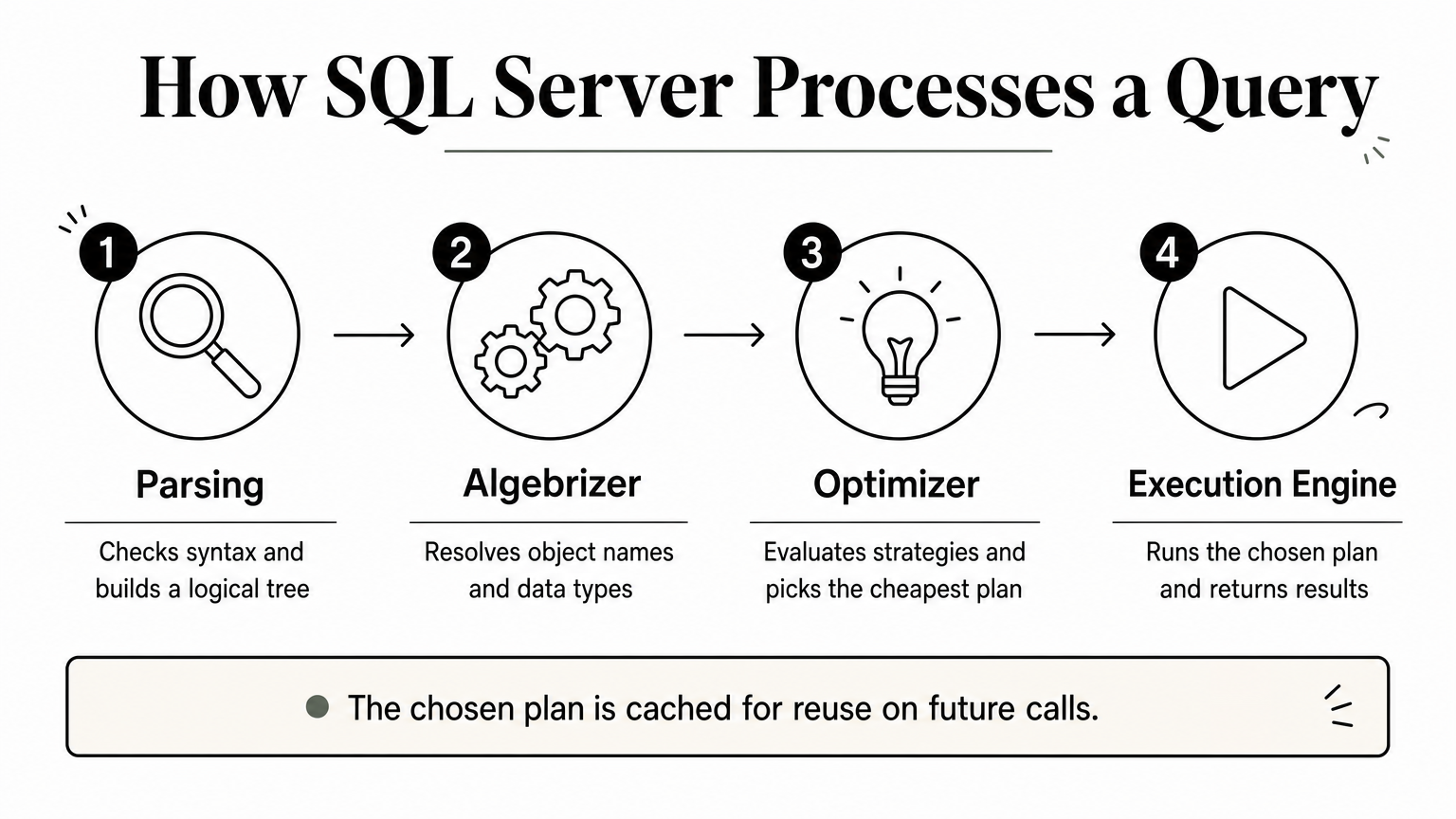
Parsing comes first, checking the query's syntax and turning it into a logical tree. Next, the algebrizer resolves object names and data types, producing a query tree. The optimizer then evaluates multiple possible execution strategies and picks the one it estimates as cheapest, based on statistics and indexes available. Finally, the execution engine runs that chosen plan and returns results, often caching the plan in the plan cache for reuse. Strong candidates mention that this caching is exactly why parameter sniffing happens, tying the architecture question back to the performance-tuning topics covered earlier.
15. Security, roles, and administration
Security questions round out this list because they test whether a candidate thinks about SQL Server as production infrastructure, not just a place to run queries. Anyone can grant db_owner to everyone and call it done; a candidate who's actually managed a live database knows that approach eventually causes an incident. These questions come up often in interview questions and answers of SQL Server for DBA and senior developer roles, since access control mistakes are expensive to fix after the fact.
What is the difference between a login and a database user?
A login authenticates at the server level, either through SQL Server authentication or Windows authentication, and grants access to the instance itself. A database user maps to that login inside a specific database and controls what the login can actually do once connected. Candidates should explain that a login without a mapped user can connect to the server but touch nothing, while orphaned users, a database user with no matching login, cause real headaches after a restore or migration.
A login gets you through the front door; a database user decides which rooms you can enter.
How do roles and permissions secure a SQL Server database?
Grouping permissions into roles instead of assigning them to individual users keeps administration manageable as teams grow. Fixed database roles like db_datareader and db_datawriter cover common cases, while custom roles handle situations needing finer control. Strong candidates mention the principle of least privilege, granting only what a job requires, and they'll flag that relying on the sa account or blanket db_owner access for applications is a common but avoidable security mistake.
Getting interview-ready with SQL Server
Running through these 30 SQL Server interview questions and answers gives you a reliable way to separate candidates who've memorized syntax from those who've actually debugged a deadlock or tuned a slow query under pressure. Notice how the strongest answers throughout this list share a pattern: they explain tradeoffs, mention real production scenarios, and don't just recite definitions. That's the signal worth listening for, whether you're screening a junior developer or vetting someone for a senior DBA seat.
Once you know what a good answer sounds like, the harder problem is finding candidates worth asking these questions to in the first place. If your team is stuck sourcing the same shallow resumes on every search, you don't need another job board subscription. Search 180,000+ verified SQL candidate profiles already screened for real experience, and start shortlisting for your next opening today.
For engineers
Find work worth your time.
Live engineering roles across India and the US, matched to your stack. Build a profile recruiters actually discover.