
Next.js Interview Questions and Answers for Every Level
If you have a Next.js interview coming up, you need a list that moves from basics to senior-level topics without padding. Most next js interview questions circle the same ground: rendering modes, routing, data fetching, and how the App Router changed all three. Interviewers use them to see whether you understand trade-offs, not whether you can recite docs.
This article gives you next js interview questions and answers in a form you can actually rehearse, and you can run them through a mock interview with an AI interviewer too. Each answer is short, direct, and written the way you would say it out loud. Expect to explain SSR versus SSG, when to pick Server Components over Client Components, and how caching affects what users see.
The questions are grouped by level: fundamentals, intermediate, and senior. Start where you feel least sure and work upward.
A note on why we cover this at Olibr. We build hiring software for recruiters, and we see which technical questions screen candidates in and out. That view shapes which questions below matter most. Use them to prepare, then answer with examples from your own projects.
1. Next.js fundamentals and how it differs from React
Sample questions
Interviewers open with fundamentals to test your mental model. Almost every set of next js interview questions starts with some version of these, and a weak answer here makes the harder rounds uphill.
- What is Next.js, and what problems does it solve that plain React does not?
- How is Next.js different from a React app built with Vite?
- Why is Next.js called a framework while React is a library?
- Which features do you get out of the box?
- Why would you choose Next.js for a project, and when would you not?
Strong answer approach
Lead with a one-line definition. Next.js is a React framework that adds routing, rendering, data fetching, and bundling on top of React. React describes your UI. Next.js decides where and when that UI runs, on the server, at build time, or in the browser.
Then compare React and Next.js on concrete points. A table keeps the comparison easy to say out loud.
| Concern | React alone (Vite SPA) | Next.js |
|---|---|---|
| Routing | Add React Router | File-system routing built in |
| Rendering | Client-side by default | Server, static, or client per route |
| SEO | Needs extra setup | HTML arrives ready to crawl |
| Backend code | Separate server | Route Handlers and Server Actions |
| Optimization | Mostly manual | Image, font, and script components, automatic code splitting |
Next.js does not replace React, it is a framework that decides where your React code runs.
Finish with a trade-off, because that is what separates mid-level from junior answers. Next.js costs you a server runtime and a steeper mental model. A small internal dashboard behind a login may not need it, but a public marketing site or storefront that depends on search traffic usually does.
Common mistakes
Many candidates say Next.js is "React with SSR" and stop. That is too narrow. Server rendering is one feature, and you miss routing, caching, image handling, and server-side code that interviewers want to hear about.
Another slip is claiming Next.js is always faster. It is not. A badly cached server-rendered page can be slower than a static SPA shell. Name the trade-off and you sound like someone who has shipped it.
2. App Router vs Pages Router
Sample questions
Since Next.js 13, this is the most common follow-up to the fundamentals. Interviewers want to know if you can work in both routers and explain why the App Router exists.
- What is the difference between the App Router and the Pages Router?
- Can both routers live in the same project?
- Why did Next.js introduce the App Router?
- How would you migrate a Pages Router app?
Strong answer approach
Start with the directories. The Pages Router uses pages/, and the App Router uses app/. Then compare the behavior that matters.
| Feature | Pages Router | App Router |
|---|---|---|
| Components | Client, hydrated | Server by default |
| Data fetching | getServerSideProps, getStaticProps |
async components, fetch |
| Layouts | _app and _document |
Nested layout.js files |
| Streaming | Limited | Built in with Suspense |
The App Router changes the default from shipping JavaScript to the browser to keeping work on the server.
Finish with migration. Both routers can coexist in one project, so you move route by route instead of rewriting everything. Say that the same URL cannot exist in both folders, because the build fails on the conflict.
Common mistakes
Some candidates call the Pages Router deprecated. It is not. Next.js still supports it, and many production apps run on it. Say "older" or "legacy in new projects," not "removed."
Another mistake is claiming the App Router is always better. It adds a steeper learning curve and some library compatibility issues, especially with tools that assume client-only rendering. Name one real cost and your answer sounds like experience, not a docs summary.
3. Routing, layouts and file conventions
Sample questions
Routing questions test whether you understand how folders map to URLs and which files do what. Expect some of these.
- How does file-system routing work in the App Router?
- What is the difference between
layout.jsandtemplate.js? - How do you build dynamic and catch-all routes?
- What are route groups?
- What does
not-found.jsdo?
Strong answer approach
Start with the rule: each folder is a route segment, and a route becomes public only when it contains a page.js. Then name the special files by purpose.
| File | Purpose |
|---|---|
page.js |
UI unique to a route |
layout.js |
Shared UI that persists across navigation |
template.js |
Shared UI that remounts on navigation |
loading.js |
Suspense fallback |
error.js |
Error boundary |
not-found.js |
404 UI |
A folder defines a route segment, but only a
page.jsfile makes it reachable.
Cover dynamic segments next: [slug] matches one segment, [...slug] matches many, and [[...slug]] also matches the bare path. Route groups like (marketing) organize code without changing the URL. Finish with layouts. They keep state while users move between child pages, which is why a navbar belongs there.
Common mistakes
Many candidates say layouts re-render on every navigation. They do not, and layouts preserve state. Templates are the ones that remount, so confusing the two shows you have not built anything stateful.
Another slip is reading params like a plain object. In recent versions it is a Promise you must await in async components. Mention that detail and you signal current, hands-on experience.
4. Server Components vs Client Components
Sample questions

This topic appears in nearly every set of next js interview questions for App Router roles, because it tests whether you understand the new default and its limits.
- What is a Server Component, and why is it the default?
- When do you need the
"use client"directive? - Can a Client Component import a Server Component?
- How do you pass data from the server to the client?
- What can a Server Component not do?
Strong answer approach
Begin with the definition. Server Components render on the server and send no component JavaScript to the browser. They can read databases, use secrets, and await data directly. Client Components hydrate in the browser, so they are the place for state, effects, and event handlers.
| Need | Use |
|---|---|
| Fetch data, read secrets | Server Component |
useState, useEffect |
Client Component |
onClick, onChange |
Client Component |
Browser APIs like localStorage |
Client Component |
| Heavy library used only for rendering | Server Component |
Keep components on the server by default and add
"use client"only at the smallest interactive leaf.
Place the boundary low in the tree. Mark a button or a form as client code, not the whole page. Props that cross the boundary must be serializable, so no functions or class instances. A Client Component can still render Server Components if you pass them in as children.
Common mistakes
Many candidates say Server Components are the same as SSR. They are not. SSR still hydrates the component in the browser, while a Server Component never does.
Another mistake is adding "use client" to every file after the first hook error. That ships more JavaScript and throws away the main benefit. Extract the interactive piece into its own small file instead, and leave the rest on the server.
5. Rendering strategies: SSR, SSG, CSR and ISR
Sample questions
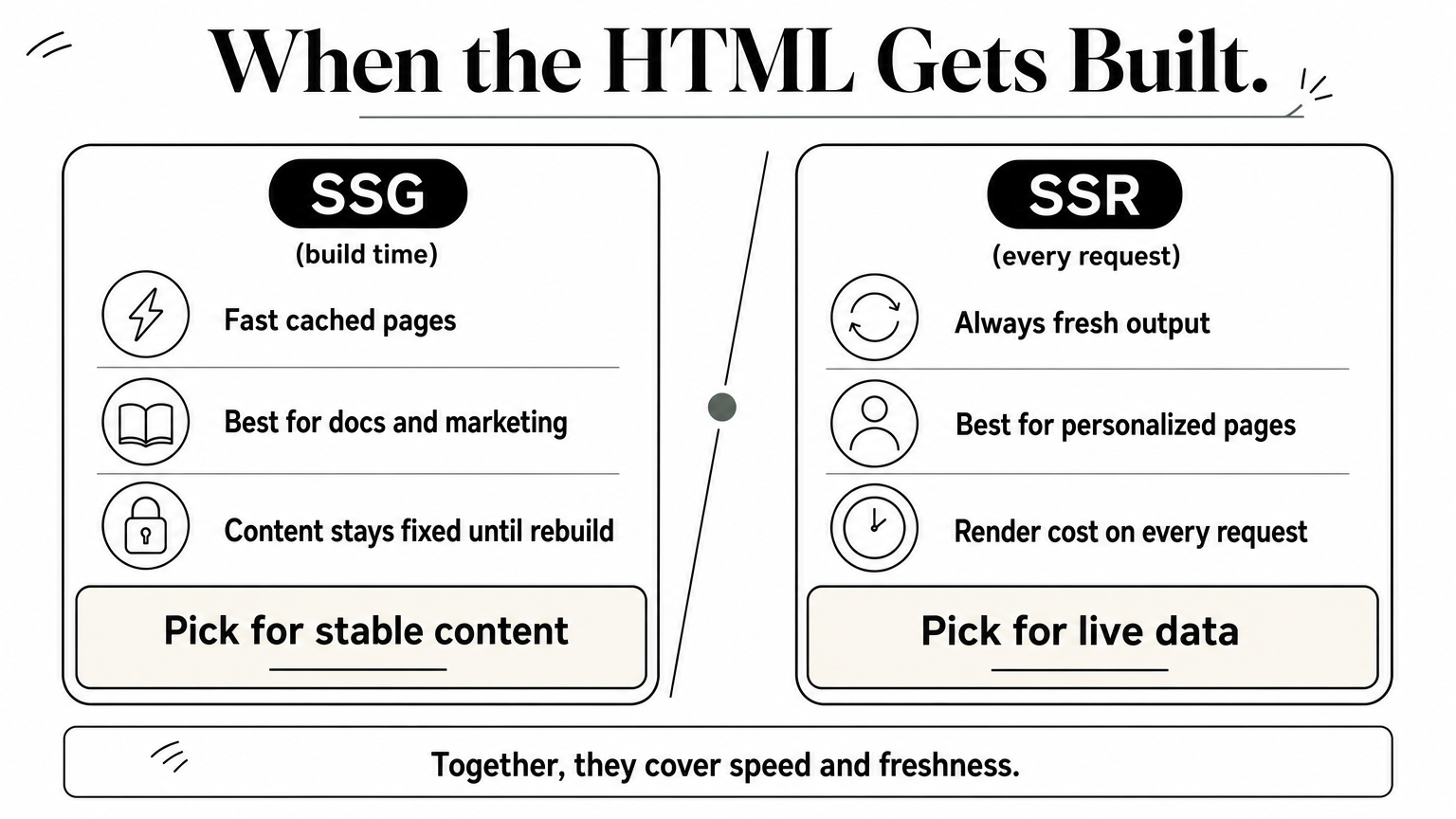
Rendering is where SSR versus SSG gets tested head on. These next js interview questions check whether you can match a strategy to a page.
- What is the difference between SSR, SSG, CSR, and ISR?
- Which strategy fits a blog, a dashboard, and a product page?
- How does the App Router decide if a route is static or dynamic?
- What does ISR do when a cached page goes stale?
Strong answer approach
Define each strategy by when the HTML is produced. That one idea keeps your answer short and accurate.
| Strategy | HTML generated | Best for |
|---|---|---|
| SSG | At build time | Docs, marketing pages |
| SSR | On every request | Personalized or live data |
| ISR | At build, refreshed after an interval | Catalogs, blog indexes |
| CSR | In the browser | Private dashboards |
Rendering strategy is a decision about when HTML gets built, and you make it per route.
In the App Router, routes are static by default. Calling cookies() or headers(), or fetching with cache: 'no-store', makes the route dynamic. For ISR, set export const revalidate = 60 on the route. In the Pages Router, the equivalents are getStaticProps with revalidate and getServerSideProps.
Common mistakes
Many candidates describe these as app-wide choices. They are not. A single project can serve a static homepage, an ISR blog, and an SSR account page side by side.
ISR also gets confused with SSR. ISR serves the cached page immediately and rebuilds it in the background, so one visitor may still see slightly old content. SSR never serves a stale page, but it pays the render cost on every request.
6. Data fetching in Next.js
Sample questions
Data fetching shows whether you have built a real page. These next js interview questions usually arrive with a "why" attached.
- How do you fetch data in a Server Component?
- What is a request waterfall, and how do you avoid it?
- When would you fetch on the client instead?
- How do
getStaticPropsandgetServerSidePropsmap to the App Router? - How do you fetch data in parallel?
Strong answer approach
Start with the default. In the App Router, a Server Component can be async, so you await data directly in the component, from fetch or straight from a database. You need no effect and no hand-written loading state. Then map the older APIs to the new model.
| Pages Router | App Router |
|---|---|
getStaticProps |
async component on a static route |
getServerSideProps |
async component on a dynamic route |
getStaticPaths |
generateStaticParams |
Fetch on the server by default, and fetch on the client only when a user action drives the request.
Next, cover speed. Sequential awaits create request waterfalls, so start independent calls together with Promise.all. You can also split slow parts into their own components wrapped in Suspense, which lets the rest of the page stream first. For client fetching, name SWR or TanStack Query and use cases like polling or search-as-you-type.
Common mistakes
Many candidates reach for useEffect out of habit. That adds a client round trip and ships extra JavaScript for data the server could have fetched. Interviewers notice.
Awaiting two unrelated calls one after the other is another frequent slip. The second call waits for no reason, so the page is slower than it needs to be. Say you would parallelize them and you show you think about latency.
7. Caching and revalidation
Sample questions

Caching is where next js interview questions get tricky, because the defaults changed between versions. Expect some of these.
- What caching layers does Next.js have?
- How do time-based and on-demand revalidation differ?
- What is the difference between
revalidatePathandrevalidateTag? - Why is my page showing stale data?
Strong answer approach
Open with the layers, then say which ones you control.
| Layer | What it stores | Lasts |
|---|---|---|
| Request memoization | Duplicate fetches in one render | One request |
| Data Cache | Server fetch results | Across requests |
| Full Route Cache | Rendered HTML and RSC payload | Until revalidated |
| Router Cache | Visited routes in the browser | The session |
Caching is only safe when you know exactly how each cached piece gets invalidated.
Then cover revalidation. Time-based uses next: { revalidate: 3600 } on a fetch. On-demand calls revalidateTag('posts') or revalidatePath('/blog') from a Server Action or Route Handler after a mutation. Tag your fetches with next: { tags: ['posts'] } so one call refreshes everything related.
Finally, show you know the version history. Next.js 15 stopped caching fetch and GET Route Handlers by default, and newer releases add the use cache directive for explicit opt-in caching.
Common mistakes
Candidates often assume fetch is cached by default. That was true in Next.js 14, but since version 15 you opt in. Quoting old defaults tells the interviewer your knowledge is out of date.
Forgetting to invalidate after a write is the other classic slip. A user saves a change and still sees the old page, because nothing told the cache the data moved. Say you would pair every mutation with a tag or path revalidation.
8. Route Handlers, API routes and Server Actions
Sample questions
Backend questions separate people who have built full-stack features from people who have only styled pages. These next js interview questions usually ask you to choose between three tools.
- What is the difference between API routes and Route Handlers?
- What is a Server Action, and how do you call one?
- When would you pick a Route Handler over a Server Action?
- How do you secure a Server Action?
Strong answer approach
Start with the mapping. API routes live in pages/api and use a request and response pair. Route Handlers live in app/ inside a route.js file and export functions named after HTTP methods, such as GET and POST, built on the Web Request and Response APIs.
| Need | Use |
|---|---|
| Form submit or mutation from your own UI | Server Action |
| Public endpoint, webhook, or mobile client | Route Handler |
| Legacy Pages Router app | API route |
Use Server Actions for your own UI's mutations and Route Handlers for anything another client must call.
Then explain Server Actions. Mark a function with "use server" and call it from a form's action or an event handler. Next.js creates a POST endpoint behind it. Treat that endpoint as public and validate input and check authorization inside every action, exactly as you would in an API route.
Common mistakes
Some candidates say Server Actions replace all APIs. They do not. Webhooks and third-party consumers need a stable URL, and only a Route Handler gives you one.
Another slip is skipping auth because the button is hidden. Anyone can call the endpoint directly. Finally, remember revalidatePath after a mutation, or the UI stays stale after a successful save.
9. Hydration, loading and error handling
Sample questions
Here the next js interview questions shift from what you build to what happens when it runs slowly or breaks.
- What is hydration, and what causes a hydration mismatch?
- How does
loading.jswork? - How does
error.jsdiffer fromglobal-error.js? - How do you show a fallback while part of a page streams in?
Strong answer approach
Define hydration first. The server sends HTML, then React attaches event handlers in the browser to make it interactive. A mismatch happens when the first browser render differs from the server HTML. Typical causes are Date.now(), Math.random(), reading window, or invalid nesting like a <div> inside a <p>. Move browser-only values into useEffect.
| File | Role | Key detail |
|---|---|---|
loading.js |
Instant fallback through Suspense | Wraps the page and its children |
error.js |
Catches errors in a segment | Must be a Client Component, receives reset |
global-error.js |
Catches root layout errors | Defines its own <html> and <body> |
Hydration bugs happen when the server and the browser disagree about the first render.
Add that granular <Suspense> boundaries let fast content appear first while slow parts stream in later. That is how you avoid one slow query blocking the whole page.
Common mistakes
Candidates often expect error.js to catch everything. It does not catch errors in the layout of the same segment, or errors thrown inside event handlers. The parent boundary covers the first case, and a try/catch covers the second.
Another slip is silencing the warning with suppressHydrationWarning everywhere. That hides a real bug. Find the differing value and make the first render deterministic instead.
10. Performance, SEO and built-in optimizations
Sample questions
Performance questions check whether you measure before you optimize. These next js interview questions often arrive with a Lighthouse report attached, so expect to name specific metrics and tools.
- How does
next/imageimprove performance? - How do you set metadata for SEO in the App Router?
- What does
next/fontdo? - How do you reduce the JavaScript bundle size?
- Which Core Web Vitals do you track?
Strong answer approach
Group your answer by built-in tool, then say what each one fixes.
| Tool | What it does |
|---|---|
next/image |
Resizes, serves WebP or AVIF, lazy loads, reserves space |
next/font |
Self-hosts fonts and prevents layout shift |
next/script |
Controls when third-party scripts load |
next/link |
Prefetches routes that enter the viewport |
| Metadata API | metadata or generateMetadata for titles, Open Graph, canonical URLs |
Next.js ships the optimizations, but you still have to apply them to the right elements.
Then get specific. Mark the hero image as high priority to improve LCP, and use next/dynamic to lazy load heavy client components. Run @next/bundle-analyzer to find what bloats the bundle. For SEO, export sitemap.ts and robots.ts, and rely on server-rendered HTML so crawlers see content immediately.
Common mistakes
Many candidates still reach for a plain <img> tag. That skips automatic resizing and lazy loading, and it often causes layout shift, which hurts CLS.
Another slip is optimizing by guesswork. Say you would profile first with Lighthouse and field data, then fix the largest bottleneck. Finally, loading a chat widget or analytics script with a raw <script> tag can block rendering, so use next/script with a sensible strategy.
11. Authentication, middleware and security
Sample questions
Security questions show whether you treat the server as a trust boundary. These next js interview questions start simple, then ask what happens when a check is skipped.
- How do you add authentication to a Next.js app?
- What is middleware, and what is it good for?
- Where should you check authorization?
- How do you store sessions safely?
- How do you keep secrets out of the browser?
Strong answer approach
Start with the split. Middleware runs before a request completes, so use it for fast, coarse checks such as redirecting users who have no session cookie. Newer versions rename the file to proxy, so mention that. Real authorization belongs next to the data, in Server Components, Server Actions, and Route Handlers.
| Concern | Where to handle it |
|---|---|
| Redirect logged-out users | Middleware or proxy |
| Check permissions | Data access layer, on every request |
| Session storage | httpOnly, Secure, SameSite cookies |
| Secrets | Server-only env vars, no NEXT_PUBLIC_ prefix |
Middleware can redirect users, but only checks next to your data can protect it.
Name a library like Auth.js or Clerk instead of rolling your own crypto.
Common mistakes
Many candidates say middleware alone secures a route. A 2025 bypass (CVE-2025-29927) showed why that fails, so verify the session again wherever data is read.
Storing JWTs in localStorage is another slip. Any injected script can read them, so prefer httpOnly cookies. Finally, putting an API key in a NEXT_PUBLIC_ variable publishes it to every visitor, because Next.js inlines those values into the browser bundle.
12. Deployment, configuration and environment variables
Sample questions
Deployment questions show whether you have shipped anything beyond localhost. These next js interview questions are short, but they expose gaps fast.
- How do you deploy a Next.js app, and where can you host it?
- What is the difference between
next buildandnext start? - What does
output: 'export'do? - What does the
NEXT_PUBLIC_prefix change? - What can you configure in
next.config.js?
Strong answer approach
Start with the hosting options, then say what each one costs you.
| Target | How | Catch |
|---|---|---|
| Vercel | Connect a Git repo | Easiest, usage-based billing |
| Node server | next build, then next start |
You manage scaling |
| Docker | output: 'standalone' |
Smaller image, you run it |
| Static export | output: 'export' |
No server features |
Next, cover variables. Next.js loads .env.local and related files. Values with the NEXT_PUBLIC_ prefix are inlined at build time, so changing one needs a rebuild. Everything else is read on the server at runtime.
Public variables are frozen at build time, while server variables are read at runtime.
Finish with next.config.js. Mention redirects, rewrites, headers, and images.remotePatterns, which whitelists the remote hosts next/image may optimize.
Common mistakes
Many candidates change a NEXT_PUBLIC_ value in the hosting dashboard and expect the live site to update. It will not, because the old value is baked into the bundle until you rebuild.
Another slip is choosing static export and then using cookies, middleware, or Server Actions, which need a running server. Also, never commit .env.local. Keep secrets in your host's settings, and document required variables in a .env.example file.
13. Senior-level and scenario-based questions
Sample questions
Senior next js interview questions stop asking what a feature is and start asking what you would do. Expect a scenario, a constraint, and a request to defend your choice.
- A product page is slow in production. How do you diagnose and fix it?
- How would you migrate a large Pages Router app to the App Router with no downtime?
- Design caching for a catalog where prices change every few minutes.
- How would you structure a monorepo with several Next.js apps?
- Users see stale data after checkout. Where do you look first?
Strong answer approach
Use a repeatable frame: clarify, measure, decide, name the cost. Ask about traffic, data freshness, and team size first. Then tie every choice to a measurable outcome, such as LCP, time to first byte, or cache hit rate.
For the migration, say you move route by route, keep both routers running, and ship behind a feature flag. For the catalog, combine tagged caching with on-demand revalidation whenever a price changes.
Senior answers name the constraint first, then the trade-off, then the choice.
Close each answer with what you would monitor afterward. Lighthouse, Vercel Analytics, or OpenTelemetry will show whether the change worked, and saying so proves you think past the deploy.
Common mistakes
Jumping straight to a tool is the biggest slip. Saying "I'd use Redis" before asking about traffic sounds like pattern matching, not engineering, and interviewers push back hard on it.
Ignoring the team is another. A clever setup nobody else can maintain is a liability, so mention documentation and ownership. Finally, skip no rollback plan. Explain how you would revert, and you sound like someone who has been paged at night.
Preparing for your Next.js interview
Strong answers to next js interview questions share one pattern: a plain definition, a concrete example, and a named trade-off. If you can say when a route is static or dynamic, where the "use client" boundary belongs, and how you would invalidate a cache after a write, you already cover most of what interviewers ask.
Practice is what makes it stick. Pick the three sections where you felt least sure, say the answers out loud, and then build a small App Router project that proves each one. Examples from your own work beat memorized definitions every time.
Once you feel ready, put it to use. Browse open developer jobs in India on Olibr, apply directly, and take an AI-powered interview to test yourself on a real role.
For engineers
Find work worth your time.
Live engineering roles across India and the US, matched to your stack. Build a profile recruiters actually discover.