Resume Parser Meaning: What It Is and How Recruiters Use It
A resume parser is software that reads a CV in PDF, DOCX or image form and converts it into structured fields such as name, phone, email, skills, employers, dates and education. That is the resume parser meaning in one line: it turns a document made for human eyes into data that a database can search, filter and sort. "CV parser" and "resume parsing software" describe the same thing.
If you recruit in India, you already live with the problem it solves. CVs reach you from Naukri Resdex downloads, LinkedIn, email attachments and WhatsApp forwards, each with a different layout and a file name like "Final_CV_v3.pdf". Without parsing, every CV is a file you must open to learn anything. With parsing, it becomes a record you can query.
This guide covers why recruiters and applicant tracking systems rely on parsers, how the software extracts and structures data, and how to use one in your daily routine. It also covers where parsers fail and how to catch those failures. We built Olibr, a free recruiting platform for Indian agencies and in-house teams, around this workflow, so the examples come from how Indian recruiters actually work.
Why recruiters and ATS platforms use a resume parser
The practical resume parser meaning for a recruiter is simple: it turns CVs you have to open into records you can search. That is why almost every applicant tracking system includes parsing, and why agencies that handle hundreds of CVs a week struggle without it.
The problem with CVs as files
Picture a recruiter in Pune at 11 a.m. A few CVs came from a Naukri Resdex download, a dozen arrived by email, and a hiring manager forwarded five PDFs on WhatsApp. Your client wants a Java developer with 5+ years of experience, a current CTC under 20 LPA and a notice period of 30 days or less. To answer that, you open each file, hunt for three facts and type them into an Excel sheet.

That routine fails in predictable ways. You re-type the same details again and again, mistype a phone number, and forget that the same candidate applied last month through a colleague. Nothing carries over from one requirement to the next, so every new job starts with zero memory of the CVs you already hold.
A CV that nobody can search is a CV you have already paid to source and will pay for again.
What structured data lets you do
Once a parser separates the fields, you can query them. In daily work that gives you:
- Search by skill and experience, for example "Spring Boot" with 4 to 7 years.
- Filters on current location, current and expected CTC, and notice period.
- Duplicate detection on mobile number and email, so one candidate is not submitted twice to the same client.
- Consistent profiles that you can share with clients in one format.
- Counts of candidates per requirement and per pipeline stage, which feed your client reports.
None of this needs a clever algorithm on your side. It only needs the CV text to be split into the right boxes first.
Where the parser sits next to the ATS
A resume parser is a component, not a full hiring system. The applicant tracking system (ATS) stores candidates, moves them through pipeline stages and keeps notes. The parser feeds the ATS clean data. AI matching is a third layer: parsing extracts facts, and matching compares those facts with a job description. When a vendor sells resume parsing software as a complete solution, ask what happens after the CV is parsed. If the answer is "you export to Excel", you have only solved the first step.
How a resume parser extracts and structures data
The resume parser meaning gets clearer when you follow one CV through the software. The parser reads the file, finds the sections, labels each piece of text as a specific field, and returns clean data. This takes seconds per CV.
The four stages of parsing
Most parsers, whatever engine they use, follow the same sequence:
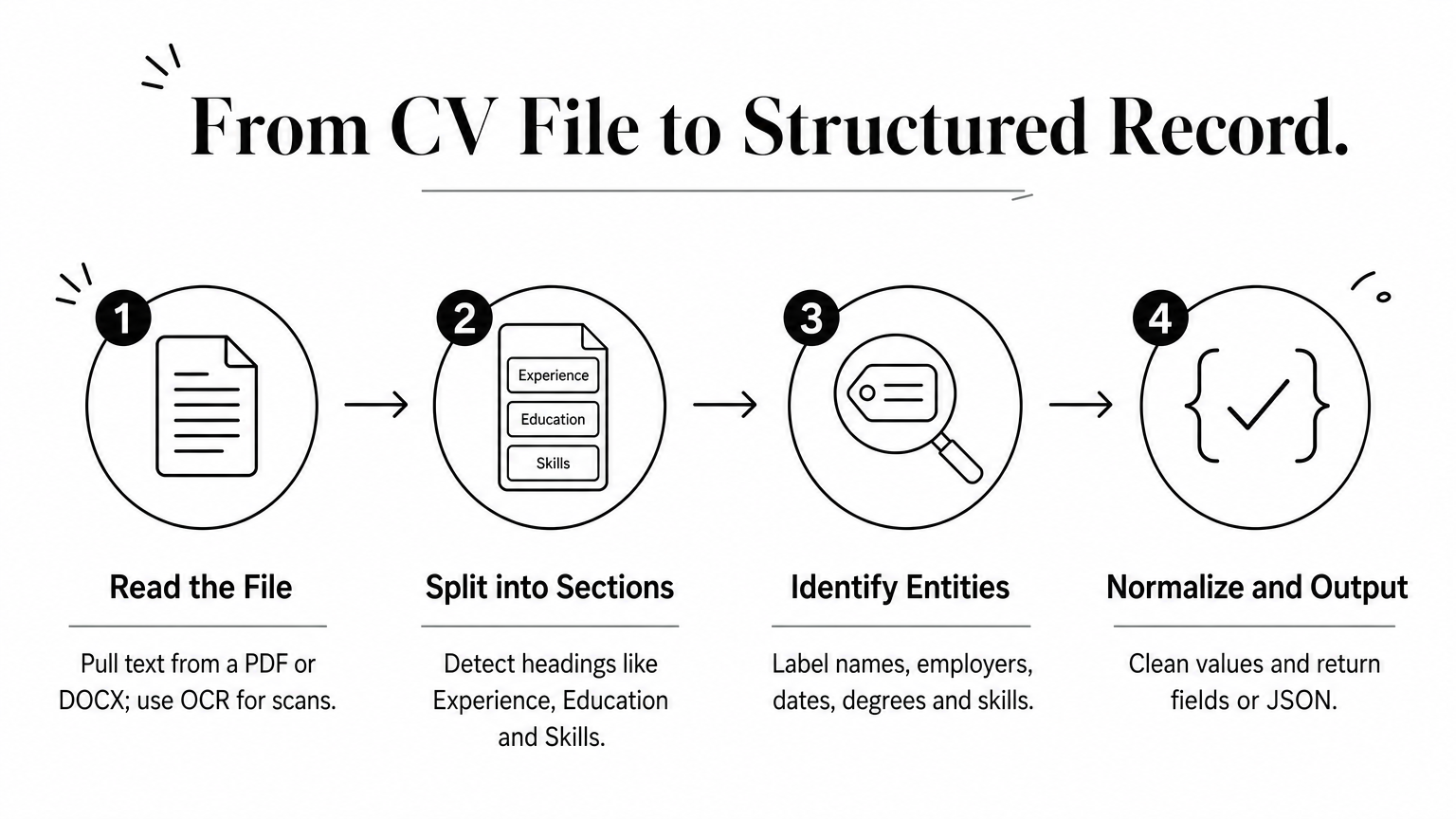
- Read the file. The parser pulls text from a PDF or DOCX. If the CV is a scanned image or a photo, optical character recognition (OCR) converts the picture into text first.
- Split into sections. It detects headings such as "Experience", "Education" and "Skills", and groups the text under them.
- Identify entities. It decides which strings are names, job titles, employers, dates, degrees, skills, phone numbers and emails.
- Normalize and output. It cleans values, for example turning "Sr. Dev" into "Senior Developer", and returns them as fields or JSON.
The hard part is stage three. A date like "2019" could be a joining year, a graduation year or a certification year, and the parser has to use context to tell them apart.
What the output looks like
The table below shows how raw CV text maps to stored fields.
| What the CV says | Parsed field | Stored value |
|---|---|---|
| Sr. Java Dev at Infosys, Jun 2019 to present | Title, employer, start date | Senior Java Developer, Infosys, 2019-06 |
| B.Tech, Computer Science, VIT Vellore, 2018 | Degree, branch, institute, year | B.Tech, Computer Science, VIT, 2018 |
| CTC 18 LPA, NP 60 days | Current CTC, notice period | 18 LPA, 60 days |
| Spring Boot, Kafka, MySQL | Skills | Three separate skill tags |
| Bangalore | Location | Bengaluru |
A typical parsed record then looks like this:
{
  "name": "Ananya Rao",
  "email": "ananya.rao@example.com",
  "phone": "+91 98XXXXXXXX",
  "current_title": "Senior Java Developer",
  "total_experience_years": 6.5,
  "skills": ["Java", "Spring Boot", "Kafka", "MySQL"],
  "current_location": "Bengaluru",
  "current_ctc_lpa": 18,
  "notice_period_days": 60
}
Fields such as CTC and notice period only appear when the CV states them. A parser reads what is written. It does not know what is missing.
Types of parsing engines
Resume parsing software uses one of four approaches, and the choice affects accuracy more than any feature list.
| Engine type | How it works | Strength | Weakness |
|---|---|---|---|
| Keyword-based | Matches predefined words and phrases | Simple and fast to set up | Misses synonyms, ignores context |
| Grammar or rule-based | Applies patterns for headings, dates and phone formats | Predictable on standard layouts | Breaks on unusual formats |
| Statistical or machine learning | Models trained on many resumes predict what each piece of text is | Handles varied layouts and context | Can err on formats it has not seen |
| LLM-based | A language model reads the text and returns fields | Copes with messy wording | Can occasionally return a value that is not on the CV |
The engine matters less than how it behaves on your own CVs, so test it before you trust it.
How to use resume parsing in your daily recruiting
To get value from a parser, feed it every CV you already have and every CV that arrives, then search the parsed data before you source anything new. Knowing the resume parser meaning only pays off when parsing becomes a habit, not a one-off clean-up.
Get CVs into the parser
Indian recruiters collect CVs in scattered places, so the import route matters as much as the parser. Olibr covers the common ones:
- Desktop Importer: reads a folder of CVs on your computer, which suits the years of PDFs sitting in "Resumes_Final" folders.
- Chrome extension: pulls candidates from Naukri Resdex and LinkedIn while you browse.
- CSV and bulk PDF or DOCX upload: handles exports from Excel sheets and batches that a colleague shares.
Parsing a single CV is part of normal use. Bulk CV parsing is one of the few paid features: the first 50 CVs per company are free, and after that it costs INR 1 per CV, paid from a wallet you top up. Plan your first batch with that in mind, and start with CVs for roles that are open right now.
A five-step routine that works
Use this sequence when a new requirement lands:
- Gather CVs for the role into one folder, including old ones from similar searches.
- Upload them as one batch instead of one by one.
- Open five parsed records at random and compare them with the original CVs.
- Fix errors and add tags such as "Hyderabad", "immediate joiner" or "client: fintech".
- Search your own database first, and go back to Resdex or LinkedIn only for the gaps.
Step three is the one people skip, and it is the one that tells you whether to trust the rest of the batch.
Turn parsed data into a shortlist
With clean fields, a shortlist takes minutes. Filter by skill, years of experience, city and notice period, then read the top profiles properly. Olibr's candidate search works the same way across the shared database, and AI matching compares parsed profiles with your job description. Treat the parser as the step that makes the shortlist possible, and keep the final call with yourself. A parsed record is a summary of a CV, not a verdict on the person.
Where resume parsers go wrong and how to check them
An honest resume parser meaning has to include its limits: parsers misread some CVs, and the errors are usually quiet. A wrong phone number or a missing skill does not raise a warning. You find out when a candidate does not pick up or a client asks why someone was skipped.
Common failure points
Layout causes most problems. Parsers read text in order, so anything that breaks that order confuses them. Watch for these:

- Multi-column templates that mix a skills sidebar into the work history.
- Text inside images, text boxes, headers or footers, which many parsers skip.
- Scanned or photographed CVs, where OCR errors creep into names and numbers.
- Heavily designed templates with icons and charts for skill levels.
Indian CVs add their own quirks. South Indian names often put the initial first or last, so the parser may split "Kumar S" the wrong way. CTC appears as "18 LPA", "18,00,000" or "18 lakhs". Employer names appear as "TCS" and "Tata Consultancy Services", and cities as "Bangalore" and "Bengaluru". Good parsers normalize these, but you should confirm that yours does.
How to test a parser before you rely on it
Take 20 of your own CVs and include the messy ones: a two-column design, a scanned copy, a fresher CV and a long profile with 12 years of experience. Parse them and check every key field against the original. Count errors per field, not per CV.
Weight the errors by what they cost you. A wrong phone number or email breaks outreach, so it is the most expensive mistake. A wrong notice period misleads a client. A missing secondary skill is usually the cheapest. If the contact fields are wrong more than occasionally, do not use that parser for bulk work.
Never reject a candidate because of what a parser did or did not extract. Use parsing to organize, and use your eyes to decide.
Handle candidate data responsibly
CVs contain personal data: phone numbers, addresses, salary details and sometimes family information. Before you upload thousands of them anywhere, find out who can see them and how long they are kept. India's Digital Personal Data Protection Act, 2023 covers personal data, so ask your legal advisor how it applies to your agency's database. Also check each platform's visibility rules. On Olibr, contributed profiles stay private to your company for 30 days, plus 14 more days while you are still working with the candidate, before they join the shared pool.
What to take away about resume parsers
A resume parser reads a CV, finds the facts inside it and stores them as fields you can search. That is the whole meaning, and it explains why parsing sits at the start of every ATS workflow. It does not hire anyone. It removes the retyping so you can spend your time on calls and client conversations.
Use it well by importing every source you have, spot-checking the output, and testing any parser on your own messy CVs before trusting it. Keep a human on every decision that affects a candidate.
If you want to try this on your own folder of CVs, sign up for a free recruiter account on Olibr and run your first batch through the importer.
For hiring teams
Search 180,000+ candidate profiles — free.
Olibr is a community-funded recruiting platform: full ATS, AI interviews, and a shared resume database. No per-seat fees.